
 gdlcf88
643bb6cd59 |
5 years ago | |
|---|---|---|
| .github/workflows | 5 years ago | |
| docs | 5 years ago | |
| sample | 5 years ago | |
| src | 5 years ago | |
| test | 5 years ago | |
| .gitattributes | 5 years ago | |
| .gitignore | 5 years ago | |
| .prettierrc | 5 years ago | |
| Directory.Build.props | 5 years ago | |
| EasyAbp.Abp.EventBus.Boxes.Dtm.abpmdl.json | 5 years ago | |
| EasyAbp.Abp.EventBus.Boxes.Dtm.abpsln.json | 5 years ago | |
| EasyAbp.Abp.EventBus.Boxes.Dtm.sln | 5 years ago | |
| EasyAbp.Abp.EventBus.Boxes.Dtm.sln.DotSettings | 5 years ago | |
| NuGet.Config | 5 years ago | |
| common.props | 5 years ago | |
docs/README.md
Abp.EventBus.Boxes.Dtm


The DTM implementation module of ABP distributed event boxes.
Introduction
This implementation uses DTM's 2-phase messages to support ABP event boxes in the multi-tenant & multi-database scene.
You should see the DTM docs, which help to understand this module.
Differences From the ABP's Default Event Boxes
| DTM 2-phase Message Boxes | ABP 5.0+ Default Boxes | |
|---|---|---|
| Speediness | ✔️ | ❌ |
| Less data transfer | ❌ | ✔️ |
| Eventual consistency (transactional UOW) |
✔️ | ✔️ |
| Eventual consistency (non-transactional UOW) |
❌ | ✔️ (consumers idempotent required) |
| Native idempotency | ✔️ | ✔️ |
| Multi-tenant-database support | ✔️ | ❌ |
| No additional external infrastructure | ❌ | ✔️ |
| Dashboard and Alarm | ✔️ | ❌ |
How Does the DTM Outbox Work?
You are publishing events using the ABP event outbox:
await _distributedEventBus.PublishAsync(eto1, useOutbox: true);
await _distributedEventBus.PublishAsync(eto2, useOutbox: true);  // The useOutbox is true by default.
The DTM outbox collects them temporarily. Let's see what it will do when you complete the current unit of work:
// Code snippet for UnitOfWork.cs
protected override async Task CommitTransactionsAsync()
{
    // Step 1: inserting a record to the DTM barrier table within the current DB transaction,
    //         and then it sends a "prepare" request to the DTM server.
    await DtmMessageManager.InsertBarriersAndPrepareAsync(EventBag);

    // Step 2: committing the current DB transaction.
    await base.CommitTransactionsAsync();

    // Step 3: sending a "submit" request to the DTM server.
    OnCompleted(async () => await DtmMessageManager.SubmitAsync(EventBag));
}
Now, the DTM server has received a "submit" request. It invokes the app's PublishEvents service with the events' data, and the latter will publish the events to the MQ provider immediately.
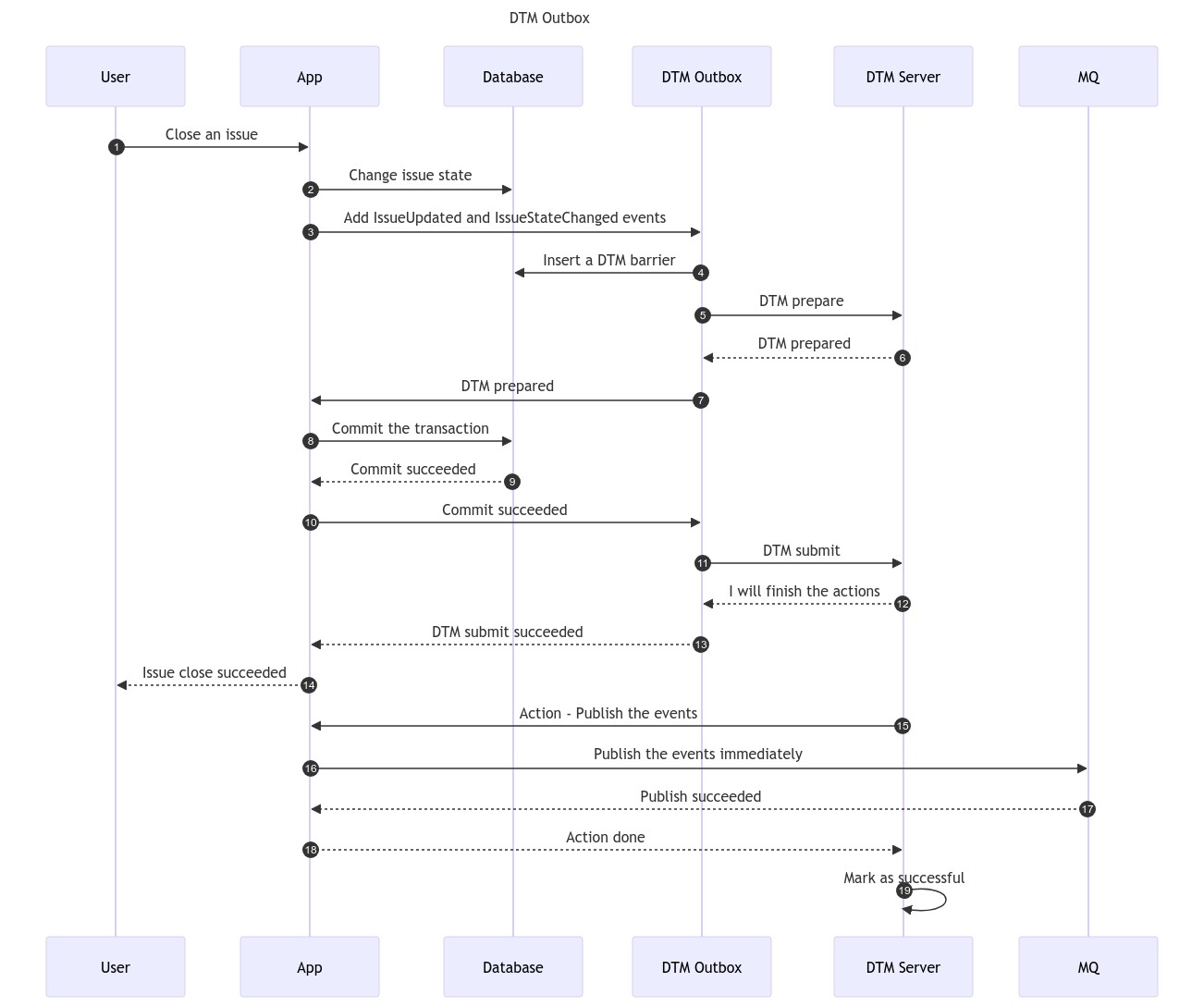
See the more detailed sequence diagram
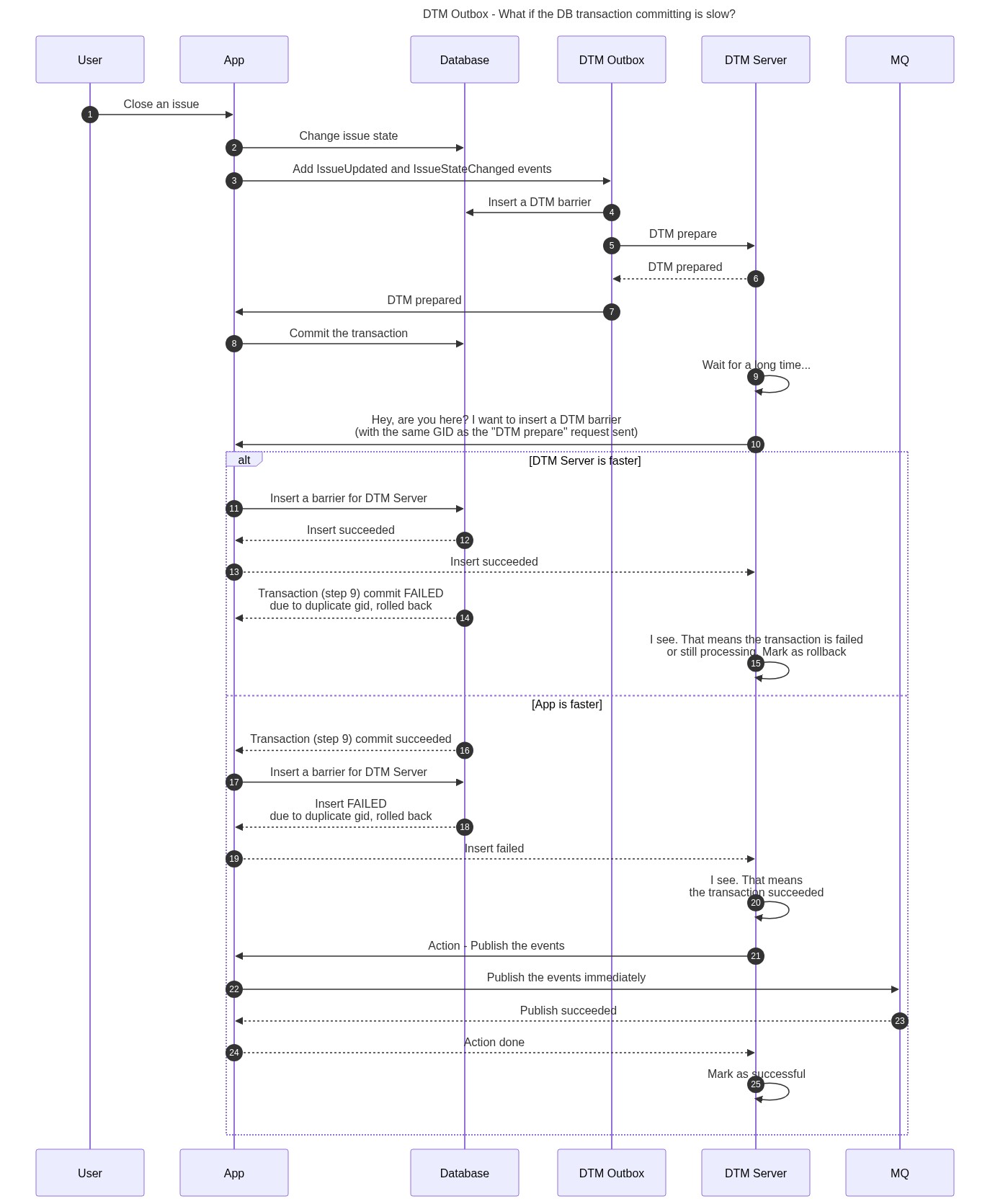
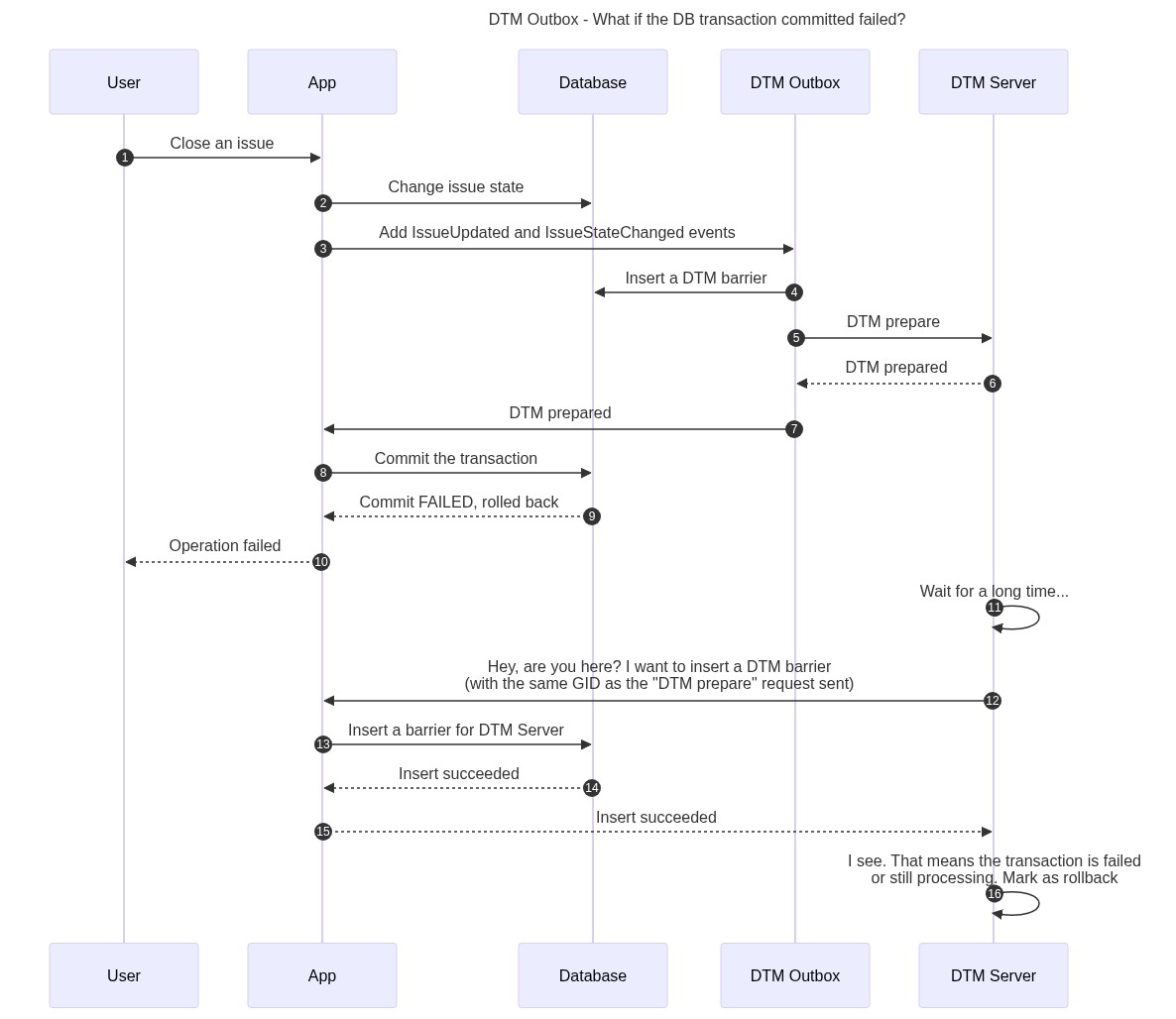
If you are still confused about how it ensures eventual consistency, see DTM's 2-phase messages doc for more information.
How Does the DTM Inbox Work?
Unlike ABP's default implementation, the DTM inbox gets an event from MQ and handles it at once. After the handlers finish their work, the inbox inserts a barrier within the current DB transaction. Finally, it commits the transaction and returns ACK to MQ.
All the incoming events have a unique MessageId. Events with the same MessageId only are handled once since we cannot insert a barrier with a duplicate gid (MessageId).
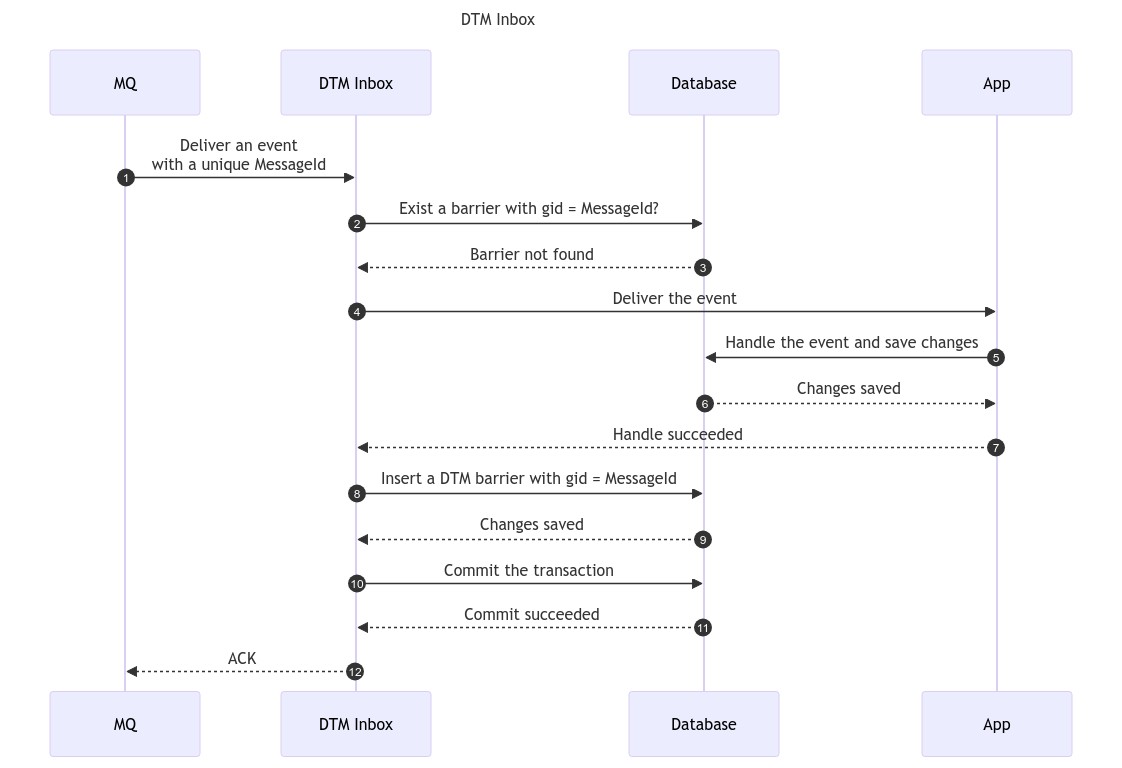
See the more detailed sequence diagram
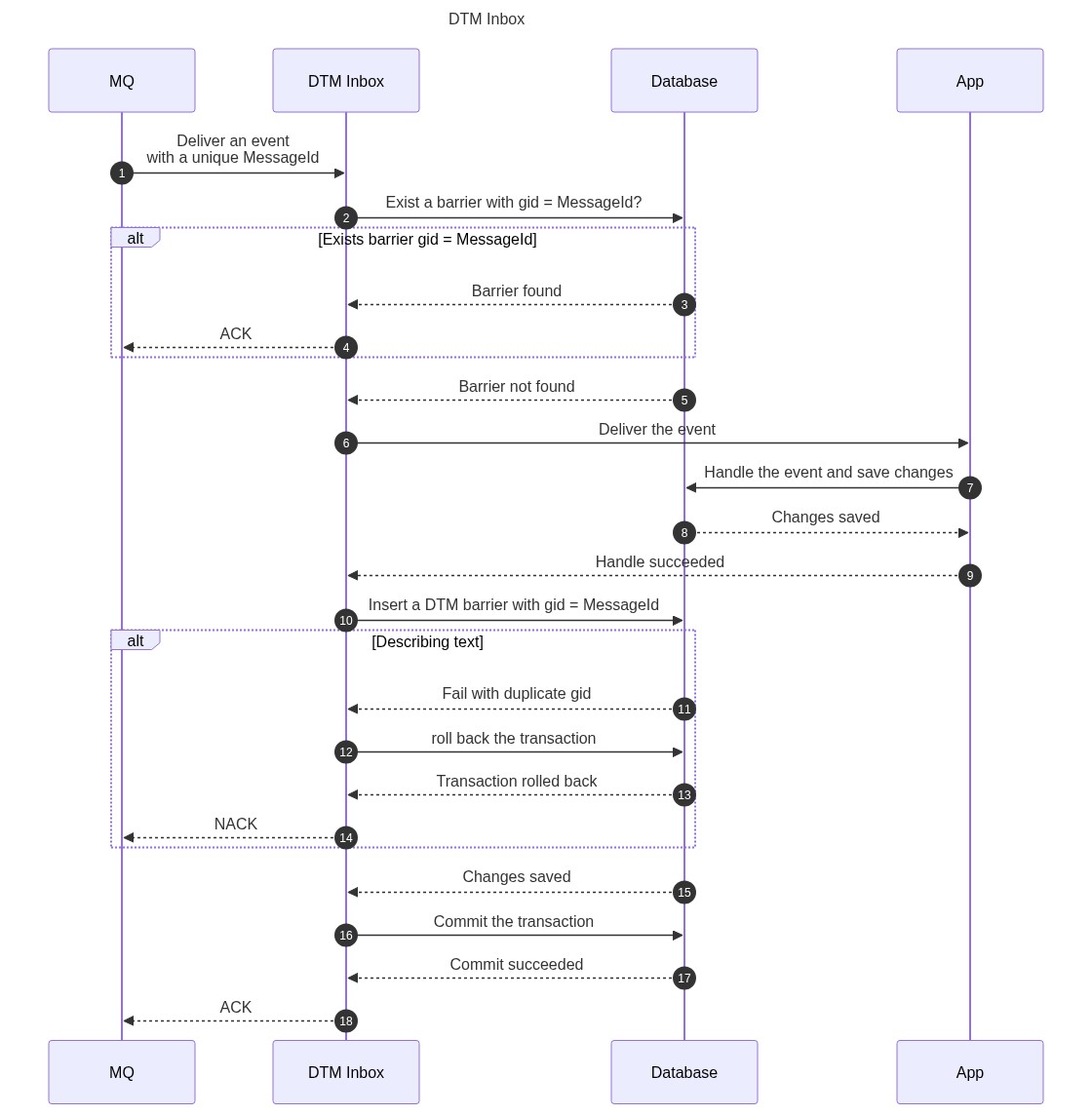
As you may have noticed, the inbox has nothing to do with the DTM Server.🤭
Installation
-
Ensure you are NOT using the CAP bus and have installed another bus provider.
-
Install the following NuGet packages. (see how)
- EasyAbp.Abp.EventBus.Boxes.Dtm.Grpc
- EasyAbp.Abp.EventBus.Boxes.Dtm.EntityFramework
- EasyAbp.Abp.EventBus.Boxes.Dtm.MongoDB
-
Add
DependsOn(typeof(AbpEventBusBoxesDtmXxxModule))attribute to configure the module dependencies. (see how) -
Configure the boxes and gRPC.
public override void ConfigureServices(ServiceConfigurationContext context)
{
    // See https://docs.abp.io/en/abp/latest/Distributed-Event-Bus#additional-configuration
    Configure<AbpDistributedEventBusOptions>(options =>
    {
        options.Outboxes.Configure(config =>
        {
            config.UseDbContextWithDtmOutbox<MyProjectDbContext>();
        });

        options.Inboxes.Configure(config =>
        {
            config.UseDbContextWithDtmInbox<MyProjectDbContext>();
        });
    });

    // Use `AddDtmOutbox` and `AddDtmInbox` separately if you only need one of them.
    context.Services.AddDtmBoxes();

    context.Services.AddGrpc();
    context.Services.AddAbpDtmGrpc(options =>
    {
        options.ActionApiToken = "1q2w3e";  // DTM Server invokes app's action APIs with this token for authorization.
        options.AppGrpcUrl = "http://127.0.0.1:54358";  // Base URL for DTM Server to invoke the current app. Only HTTP now!
        options.DtmGrpcUrl = "http://127.0.0.1:36790";  // Base URL for the current app to invoke DTM Server.
    });
}

public override void OnApplicationInitialization(ApplicationInitializationContext context)
{
    app.UseConfiguredEndpoints(endpoints =>
    {
        endpoints.MapAbpDtmGrpcService();
    });
}
Usage
-
Install and run the DTM Server. See https://en.dtm.pub/guide/install.html.
-
Ensure the intranet endpoint (you configured above) is available since the DTM Server uses it to invoke your app.
-
The DTM event boxes should work now.
Roadmap
- Barrier tables/collections auto clean up.