
mirror of https://github.com/EasyAbp/EShop.git
You can not select more than 25 topics
Topics must start with a letter or number, can include dashes ('-') and can be up to 35 characters long.
 gdlcf88
752940fb58
gdlcf88
752940fb58
|
2 years ago | |
|---|---|---|
| .. | ||
| host/EasyAbp.EShop.Plugins.Booking.Host.Shared | 2 years ago | |
| src | 2 years ago | |
| test | 2 years ago | |
| .gitattributes | 4 years ago | |
| .gitignore | 4 years ago | |
| .prettierrc | 4 years ago | |
| EasyAbp.EShop.Plugins.Booking.abpmdl.json | 4 years ago | |
| EasyAbp.EShop.Plugins.Booking.abpsln.json | 4 years ago | |
| EasyAbp.EShop.Plugins.Booking.sln | 4 years ago | |
| EasyAbp.EShop.Plugins.Booking.sln.DotSettings | 4 years ago | |
| NuGet.Config | 4 years ago | |
| README.md | 4 years ago | |
| docker-compose.migrations.yml | 4 years ago | |
| docker-compose.override.yml | 4 years ago | |
| docker-compose.yml | 4 years ago | |
README.md
EShop.Plugins.Booking




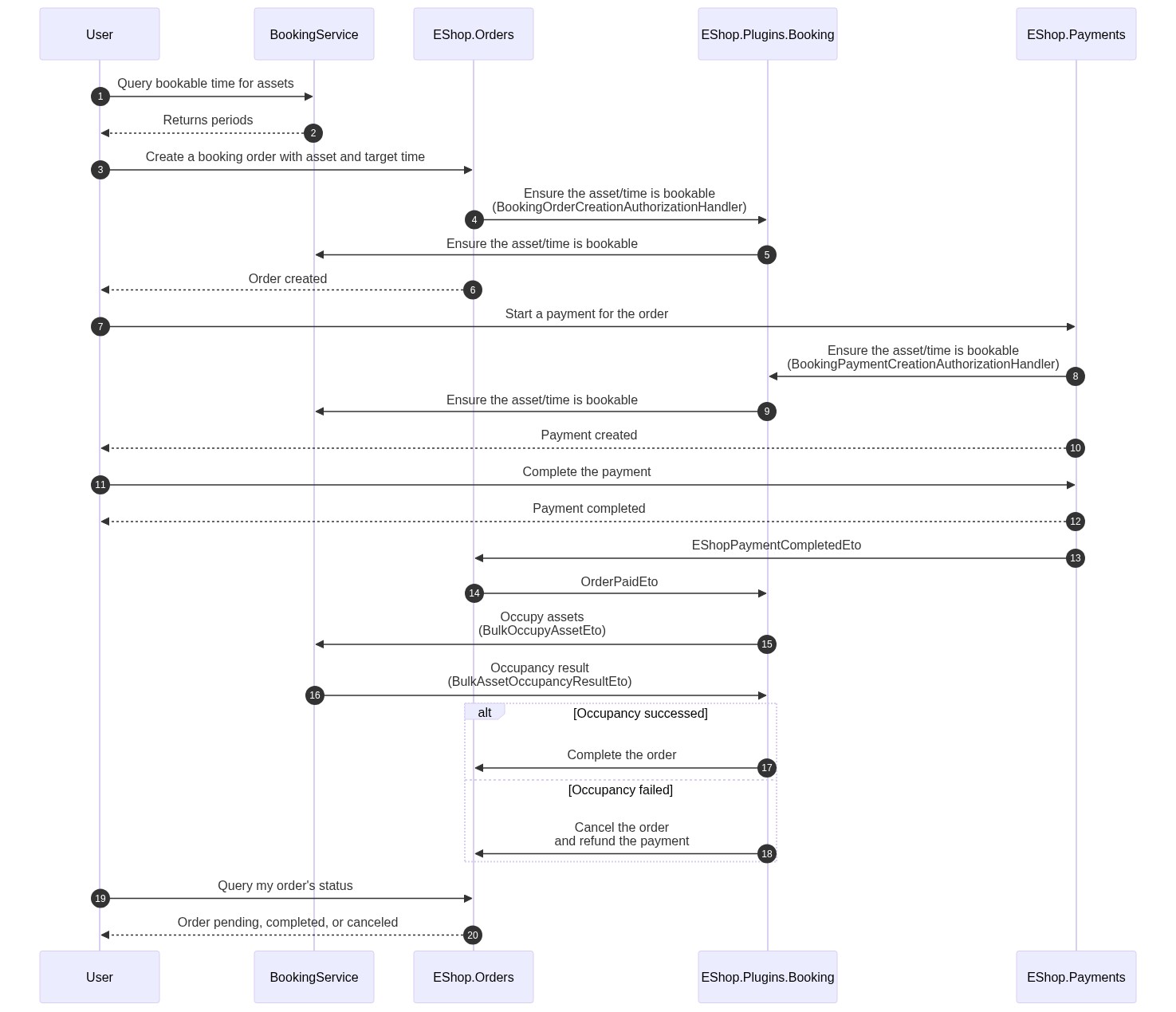
A booking-business plugin for EShop. It extends EShop to use the EasyAbp.BookingService module to help end-users to book some assets online.
Installation
-
Install the EasyAbp.BookingService module locally or remotely.
-
Install the following NuGet packages. (see how)
- EasyAbp.EShop.Orders.Booking.Application (install at EasyAbp.EShop.Orders.Application location)
- (Optional) EasyAbp.EShop.Payments.Booking.Application (install at EasyAbp.EShop.Payments.Application location)
- (Optional) EasyAbp.EShop.Plugins.Baskets.Booking.Application (install at EasyAbp.EShop.Plugins.Baskets.Application location)
- EasyAbp.EShop.Plugins.Booking.Application
- EasyAbp.EShop.Plugins.Booking.Application.Contracts
- EasyAbp.EShop.Plugins.Booking.Domain
- EasyAbp.EShop.Plugins.Booking.Domain.Shared
- EasyAbp.EShop.Plugins.Booking.EntityFrameworkCore
- EasyAbp.EShop.Plugins.Booking.HttpApi
- EasyAbp.EShop.Plugins.Booking.HttpApi.Client
- (Optional) EasyAbp.EShop.Plugins.Booking.MongoDB
- (Optional) EasyAbp.EShop.Plugins.Booking.Web
Skip installing the
EasyAbp.EShop.Payments.Plugins.Bookingmodule if you don't want to check assets are bookable during payment. -
Add
DependsOn(typeof(EShopXxxModule))attribute to configure the module dependencies. (see how) -
Add
builder.ConfigureEShopPluginsBooking();to theOnModelCreating()method in MyProjectMigrationsDbContext.cs. -
Add EF Core migrations and update your database. See: ABP document.
Usage
Admins
- Define a "booking" product group. Customers can use only these configured product groups for booking.
public override void ConfigureServices(ServiceConfigurationContext context) { Configure<EShopBookingOptions>(options => { options.BookingProductGroups.Add(new BookingProductGroupDefinition("MyBookingProductGroup")); }); } - Use the management pages to create ProductAsset or ProductAssetCategory entities to set prices and more information.
Customers
- Use BookingService module's
/api/booking-service/asset-occupancy/search-booking-periods(GET) or/api/booking-service/asset-occupancy/search-category-booking-periods(GET) to get available periods for an asset or an asset category. - Create an EShop order with these ExtraProperties:
BookingAssetIdorBookingAssetCategoryId.BookingPeriodSchemeId,BookingPeriodId,BookingVolume,BookingDate,BookingStartingTime,BookingDuration.
- Pay for the order, and then it will automatically call the BookingService module to occupy the asset.
- If the occupancy succeeds, it will set the order to complete.
- If the occupancy fails, it will cancel the order and refund the payment.