
You can not select more than 25 topics
Topics must start with a letter or number, can include dashes ('-') and can be up to 35 characters long.
6.4 KiB
6.4 KiB
Github自动化部署
添加部署 yaml
- 在项目根目录下添加 .github/workflow/
后端项目
name: 后端部署(API,IdentityServer4,Gateways) # 指定名称
on:
  push:
    branches:
      - main # 代码推送到main分支的时候触发jobs

jobs:
  build:
    runs-on: ubuntu-latest
    steps:
      - uses: actions/checkout@v2
      - name: Install Dotnet 6.x
        uses: actions/setup-dotnet@v1
        with:
          dotnet-version: "6.0" # 安装Dotnet 环境
          include-prerelease: True
      - name: 编译
        run: dotnet build aspnet-core/Lion.AbpPro.sln # 编译项目

      - name: 单元测试
        run: dotnet test aspnet-core/services/test/Lion.AbpPro.Domain.Tests/Lion.AbpPro.Domain.Tests.csproj # 运行单元测试

      - name: 发布->Lion.AbpPro.HttpApi.Host
        run: dotnet publish aspnet-core/services/host/Lion.AbpPro.HttpApi.Host/Lion.AbpPro.HttpApi.Host.csproj -o Lion.AbpPro.HttpApi.Host # 发布Host项目

      - name: 发布->Lion.AbpPro.IdentityServer
        run: dotnet publish aspnet-core/services/host/Lion.AbpPro.IdentityServer/Lion.AbpPro.IdentityServer.csproj -o Lion.AbpPro.IdentityServer # 发布IdentityServer项目

      - name: 发布->Lion.AbpPro.IdentityServer
        run: dotnet publish aspnet-core/gateways/Lion.AbpPro.WebGateway/Lion.AbpPro.WebGateway.csproj -o Lion.AbpPro.WebGateway # 发布网关项目

      - name: 部署->Lion.AbpPro.HttpApi.Host
        uses: easingthemes/ssh-deploy@v2.2.11
        env:
          SSH_PRIVATE_KEY: ${{ secrets.SSH_PRIVATE_KEY }} # 服务器生成的ssh key 在github 下添加secret
          ARGS: "-avzr --delete --exclude 'appsettings.json'" # 把发布好的项目复制到服务器,并且删除服务器上的/root/wwwroot/Lion.AbpPro.HttpApi.Host下的文件但是不包括appsettings.json
          SOURCE: "Lion.AbpPro.HttpApi.Host" # 对应上面发布好的目录
          REMOTE_HOST: ${{ secrets.REMOTE_HOST }} #  服务器公网ip地址
          REMOTE_USER: ${{ secrets.REMOTE_USER }} #  用户名
          TARGET: "/root/wwwroot" # 发布到服务器指定目录

      - name: 部署->Lion.AbpPro.IdentityServer
        uses: easingthemes/ssh-deploy@v2.2.11
        env:
          SSH_PRIVATE_KEY: ${{ secrets.SSH_PRIVATE_KEY }}
          ARGS: "-avzr --delete --exclude 'appsettings.json'"
          SOURCE: "Lion.AbpPro.IdentityServer"
          REMOTE_HOST: ${{ secrets.REMOTE_HOST }}
          REMOTE_USER: ${{ secrets.REMOTE_USER }}
          TARGET: "/root/wwwroot"

      - name: 部署->Lion.AbpPro.WebGateway
        uses: easingthemes/ssh-deploy@v2.2.11
        env:
          SSH_PRIVATE_KEY: ${{ secrets.SSH_PRIVATE_KEY }}
          ARGS: "-avzr --delete --exclude 'appsettings.json'"
          SOURCE: "Lion.AbpPro.WebGateway"
          REMOTE_HOST: ${{ secrets.REMOTE_HOST }}
          REMOTE_USER: ${{ secrets.REMOTE_USER }}
          TARGET: "/root/wwwroot"
安装 supervisor
yum install -y supervisor
systemctl start supervisord
systemctl enable supervisord # 设置为开机启动
- 默认配置目录在 /etc/supervisord.d
yum install -y supervisor
systemctl start supervisord
systemctl enable supervisord # 设置为开机启动
- 开启 web 管理界面
# vi vi /etc/supervisord.conf
[inet_http_server]         ; inet (TCP) server disabled by default
port=0.0.0.0:9001        ; (ip_address:port specifier, *:port for all iface)
username=admin              ; # 管理web端登录用户名
password=1q2w3E*.               ; # 管理web端登录密码
-
查看是否能访问 http://ip:9001
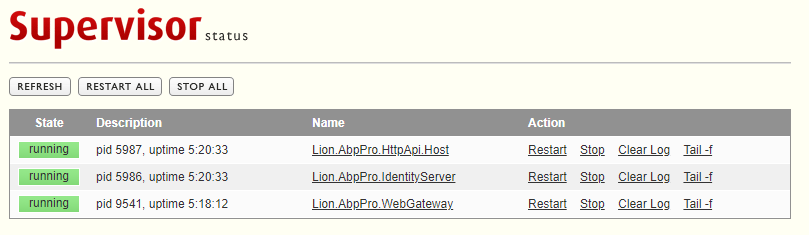
-
添加 Lion.AbpPro.HttpApi.Host.ini
[program:Lion.AbpPro.HttpApi.Host]
command=/bin/bash -c "dotnet Lion.AbpPro.HttpApi.Host.dll --urls=http://*:8011"
directory=/root/wwwroot/Lion.AbpPro.HttpApi.Host
autostart=true
autorestart=true
stderr_logfile=/root/wwwroot/Lion.AbpPro.HttpApi.Host/err.log
stdout_logfile=/root/wwwroot/Lion.AbpPro.HttpApi.Host/out.log
user=root
- 添加 Lion.AbpPro.IdentityServer.ini
[program:Lion.AbpPro.IdentityServer]
command=/bin/bash -c "dotnet Lion.AbpPro.IdentityServer.dll --urls=http://*:8013"
directory=/root/wwwroot/Lion.AbpPro.IdentityServer
autostart=true
autorestart=true
stderr_logfile=/root/wwwroot/Lion.AbpPro.IdentityServer/err.log
stdout_logfile=/root/wwwroot/Lion.AbpPro.IdentityServer/out.log
user=root
- 添加 Lion.AbpPro.WebGateway.ini
[program:Lion.AbpPro.WebGateway]
command=/bin/bash -c "dotnet Lion.AbpPro.WebGateway.dll --urls=http://*:8014"
directory=/root/wwwroot/Lion.AbpPro.WebGateway
autostart=true
autorestart=true
stderr_logfile=/root/wwwroot/Lion.AbpPro.WebGateway/err.log
stdout_logfile=/root/wwwroot/Lion.AbpPro.WebGateway/out.log
user=root
- 重新加载配置 supervisorctl reload
前端配置
- 安装 Nginx
sudo yum install -y nginx
systemctl start nginx # 启动 Nginx
systemctl enable nginx # 启用开机启动 Nginx
- 访问 http://ip:80

-- 配置 Yml
name: 前端部署(vue)
on:
  push:
    branches:
      - main

jobs:
  build:
    runs-on: ubuntu-latest
    steps:
      - name: Checkout
        uses: actions/checkout@v2.3.1
        with:
          persist-credentials: false

      - name: 编译|发布
        run: |
          cd vben271
          yarn
          npm run build

      - name: 部署->Vue
        uses: easingthemes/ssh-deploy@v2.2.11
        env:
          SSH_PRIVATE_KEY: ${{ secrets.SSH_PRIVATE_KEY }}
          ARGS: "-avzr --delete"
          SOURCE: "vben271/dist"
          REMOTE_HOST: ${{ secrets.REMOTE_HOST }}
          REMOTE_USER: ${{ secrets.REMOTE_USER }}
          TARGET: "/root/wwwroot"
- 配置 Nginx
# vi /etc/nginx/nginx.conf
    server {
        listen       8012;
        listen       [::]:8012;
        server_name  _;
        root         /root/wwwroot/dist;

        # Load configuration files for the default server block.
        include /etc/nginx/default.d/*.conf;

        #vue-router配置 解决刷新浏览器 404问题
        location / {
            try_files $uri $uri/ @router;
            index index.html;
        }
        location @router {
            rewrite ^.*$ /index.html last;
        }

        error_page 404 /404.html;
        location = /404.html {
        }

        error_page 500 502 503 504 /50x.html;
        location = /50x.html {
        }
    }