
6.4 KiB
//[doc-seo]
{
    "Description": "Discover how to implement and manage a poll system in CMS Kit Pro, enabling user engagement with easy setup and customization features."
}
CMS Kit Pro: Poll System
You must have an ABP Team or a higher license to use CMS Kit Pro module's features.
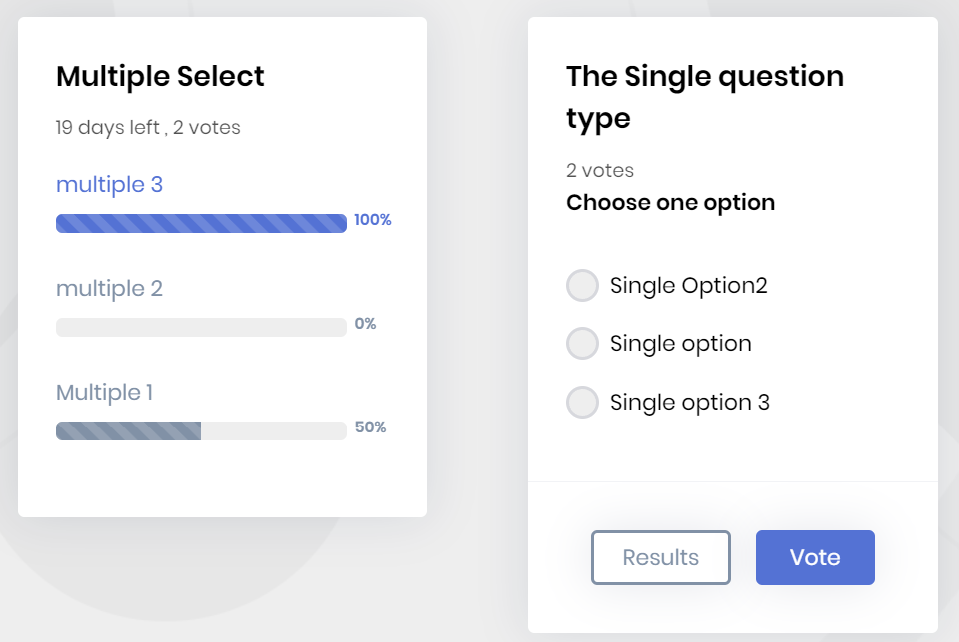
CMS Kit provides a poll system to allow users to create, edit and delete polls. Here is a screenshot of the poll widget:
Enabling the Poll System
By default, CMS Kit features are disabled. Therefore, you need to enable the features you want before starting to use them. You can use the Global Feature system to enable or disable CMS Kit features at development time. Alternatively, you can use ABP's Feature System to disable a CMS Kit feature at runtime.
Check the "How to Install" section of the CMS Kit Module documentation to see how to enable or disable CMS Kit features at development time.
User Interface
Menu Items
CMS Kit module admin side adds the following items to the main menu, under the CMS menu item:
Polls: Poll management page.
CmsKitProAdminMenus class has the constants for the menu item names.
Pages
Polls
You can list, create, update and delete polls on the admin side of your solution.


Poll Widget
The poll system provides a poll widget for users to vote and view the result. You can place the widget on a page as shown below:
@await Component.InvokeAsync(
    typeof(PollViewComponent),
    new
    {
        widgetName = "my-poll-1"
})
PollViewComponent selects a poll assigned to widgetName through the available-widget lookup. The repository returns a poll when either its voting window is open (StartDate has passed and EndDate has not passed) or its ResultShowingEndDate has not passed. The component then prevents rendering before StartDate and after ResultShowingEndDate, when that value is set. Consequently, the named widget can remain visible after EndDate during the result-showing period. The widget name must first be registered with CmsKitPollingOptions, and polls are assigned to widget names from the administration page.
To render one specific poll without registering a widget name, use its unique code:
@await Component.InvokeAsync(
    typeof(PollByCodeViewComponent),
    new
    {
        code = "developer-survey"
    })
PollByCodeViewComponent performs a direct lookup by code. It does not use the named widget's repository availability condition or component date checks, so it can render a poll before StartDate or after ResultShowingEndDate. Use it only when the hosting page applies the required availability rules.
Submitting a vote requires an authenticated user. The public vote service currently does not enforce the poll's start date, end date or result-showing end date on the server, so the host must prevent submissions outside the intended voting period. A user can submit only once for a poll; the poll's Allow multiple vote option controls whether that single submission can contain multiple options.
Options
Before using the poll system, you need to define the widgets. You can use the CmsKitPollingOptions. CmsKitPollingOptions can be configured in the domain layer, in the ConfigureServices method of your module.
Example:
Configure<CmsKitPollingOptions>(options =>
{
    options.AddWidget("my-poll-1");
});
CmsKitPollingOptions properties:
WidgetNames: List of defined widget names in the poll system. Useoptions.AddWidgetto add a unique name; adding the same name twice throws an exception.
Internals
Domain Layer
Aggregates
This module follows the Entity Best Practices & Conventions guide.
Poll
A poll represents a created poll with its options:
Poll(aggregate root): Represents a poll by including the options in the system.PollOption(entity): Represents the defined poll options related to the poll in the system.
PollUserVote
A poll user vote represents a user's vote in a poll:
PollUserVote(aggregate root): Represents poll user votes in the system.
Repositories
This module follows the Repository Best Practices & Conventions guide.
Following custom repositories are defined for these features:
IPollRepositoryIPollUserVoteRepository
Domain services
This module follows the Domain Services Best Practices & Conventions guide.
Poll Manager
PollManager is used to perform some operations for the Poll aggregate root.
Application layer
Application services
PollAdminAppService(implementsIPollAdminAppService): Implements the use cases of poll management for admin side.PollPublicAppService(implementsIPollPublicAppService): Implements the use cases of polls for public websites.
Database providers
Common
Table / collection prefix & schema
All tables/collections use the Cms prefix by default. Set static properties on the AbpCmsKitDbProperties class if you need to change the table prefix or set a schema name (if supported by your database provider).
Connection string
This module uses CmsKit for the connection string name. If you don't define a connection string with this name, it falls back to the Default connection string.
See the connection strings documentation for details.
Entity Framework Core
Tables
- CmsPolls
- CmsPollOptions
- CmsPollUserVotes
MongoDB
Collections
- CmsPolls
- CmsPollUserVotes
Entity Extensions
Check the "Entity Extensions" section of the CMS Kit Module documentation to see how to extend entities of the Poll Feature of the CMS Kit Pro module.