
9.2 KiB
Using Pushed Authorization Requests In ABP Framework
Pushed Authorization Requests (PAR) is a new OAuth 2.0 feature that allows clients to push the payload of an OAuth 2.0 authorization request to the authorization server via a direct request and provides them with a request URI that is used as reference to the data in a subsequent call to the authorization endpoint. This feature is defined in RFC 9156.
Authorization Code Flow
Let's examine the current Code Flow in the ABP Framework project.
A typical ABP layered architecture usually includes the following projects:
Acme.AuthServer: OAuth 2.0 authorization server integrated withOpenIddict.Acme.HttpApi.Host: API project that uses theJWT Bearerauthentication scheme and authenticates through theAcme.AuthServerproject.Acme.Web: An UI project configured with anOpenID Connectauthentication scheme to authenticate through theAcme.AuthServerproject.
When we attempt to use OpenID Connect authentication in the Acme.Web project, it constructs an authorization request and redirects the browser to the Acme.AuthServer project.
GET https//auth-server.acme.com/connect/authorize

Query String Parameters:

client_id: AbpApp
redirect_uri: https://web.acme.com/signin-oidc
response_type: code
scope: openid profile email roles phone AbpAPI
response_mode: form_post
nonce: YzVkMj...
state: CfDJ8N...
If you have enabled
Pkce, thecode_challengeandcode_challenge_methodparameters will also appear in the request.
code_challenge: mJxMdU...
code_challenge_method: S256
After the user successfully authenticates on the Acme.AuthServer project (via username/password or social login providers) and approves the requested permissions on the consent screen/page, it returns a code to the Acme.Web project.
The Acme.AuthServer project will construct either a POST or GET request to the Acme.Web project.
POST https://web.acme.com/signin-oidc

Form Data Parameters(application/x-www-form-urlencoded):

code: LPjZ6C...
state: state: CfDJ8N...
iss: https://auth-server.acme.com/
When the Acme.Web project receives the code, it sends an HTTP request from the application (not the browser) to Acme.AuthServer to request an access token using the received code.
POST https://auth-server.acme.com/connect/token

Form Data Parameters(application/x-www-form-urlencoded):

client_id: AbpApp
client_secret: secret
code: LPjZ6C...
grant_type: authorization_code
At this point, the Code Flow authentication process is complete, and we can use the access token to access APIs on the Acme.HttpApi.Host project.
The
Hybrid FlowandImplicit Floware similar toCode Flow. We'll focus onCode Flowin this discussion.
However, Code Flow may have the following issues:
- The authorization request can be altered. Usually, the client application redirects the user's browser to the authorization server with the authorization URL. Nothing prevents a malicious actor from changing one or more parameters of this request before sending it to the authorization server.
- No guarantee of the request's provenance. The authorization request is normally built by the client application, and the user's browser is in charge of sending it to the authorization server. However, there is no guarantee that the request has been built by the client application. Anyone can build an authorization request once they know a few data, such as the client ID and the redirect URI.
- No guarantee of confidentiality. Although the browser sends the authorization request via HTTPS, the request parameters can be intercepted by third-party applications, such as a proxy, a load balancer, or even a browser plugin. A malicious network component of this type can inject or change the request parameters, not to mention that the request itself can be logged.
- Browser limitations. Finally, a very complex query string in the authorization request may incur possible browser limitations on URL length.
OAuth 2.0 defined Pushed Authorization Requests (PAR) to address these issues.
Pushed Authorization Requests (PAR)
OpenIdDict 6.1.0 started supporting Pushed Authorization Requests (PAR). The ABP Framework(>=9.2.0) promptly upgraded its OpenIddict version and added PAR configuration in the Volo.OpenIddict.Pro module.
You can configure Pushed Authorization Requests (PAR) when creating/updating an Application.
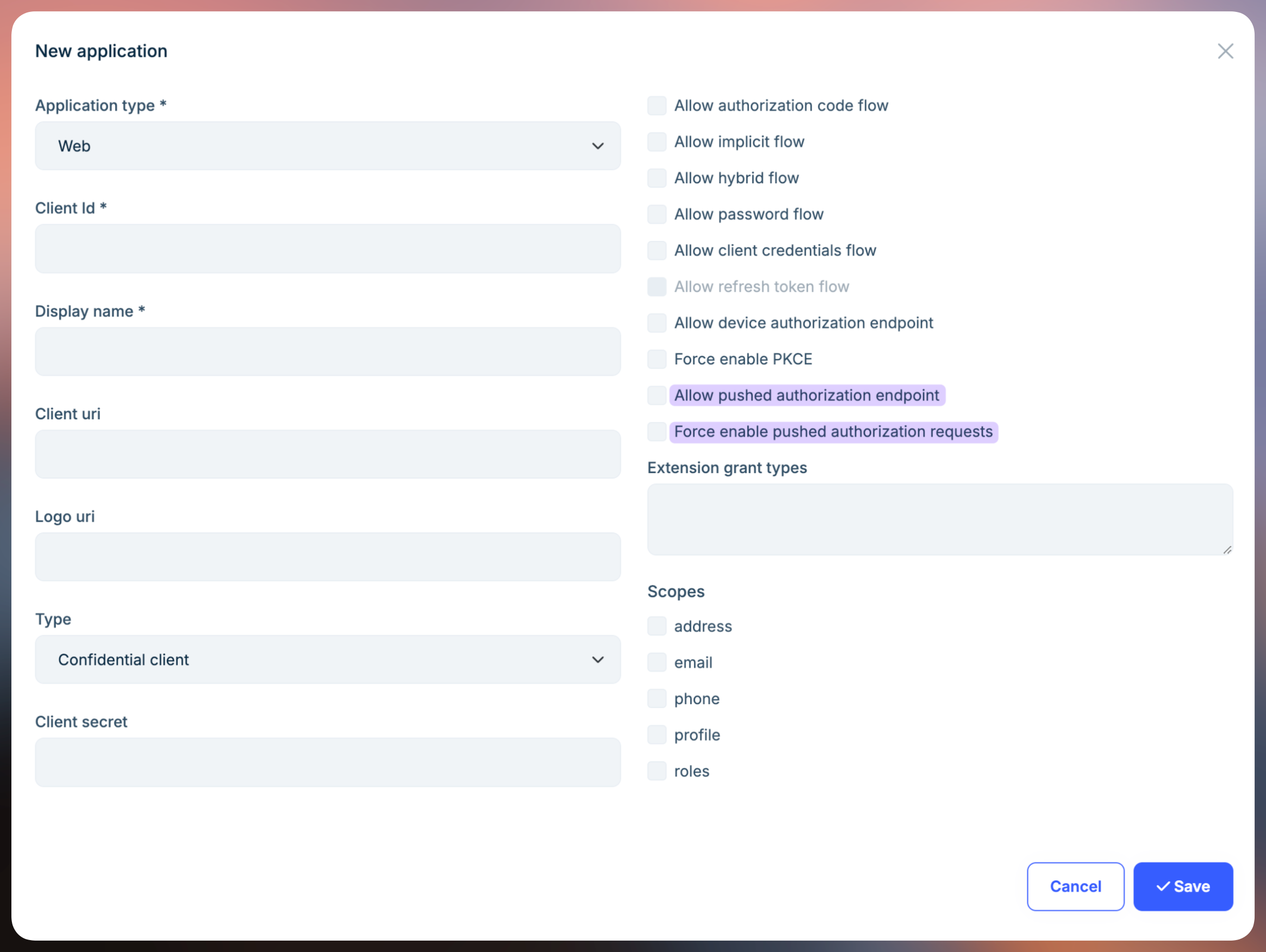
Let's examine the authentication flow using Pushed Authorization Requests (PAR).
When we attempt to use OpenID Connect authentication in the Acme.Web project, it sends an HTTP request from the application (not the browser) to the authorization server's par endpoint.
POST https://auth-server.acme.com/connect/par

Form Data Parameters:

client_id: AbpApp
client_secret: secret
redirect_uri: https://web.acme.com/signin-oidc
response_type: code
scope: openid profile email roles phone AbpAPI
response_mode: form_post
nonce: YzVkMjZmN...
state: CfDJ8NwA4...
If you have enabled
Pkce, the code_challenge and code_challenge_method parameters will also appear in thePOSTrequest.
code_challenge: mJxMdULFXnvdWfaDUfyDIb77IFlMpGyKkHN1_UWYKDk
code_challenge_method: S256
After successful verification and validation, the authorization server returns a request_uri to the Acme.Web application.
{
    "request_uri": "urn:ietf:params:oauth:request_uri:1FPVWnrwFAesetV-r-66_b7BAF_vCQm7UmPWfBqRENg",
    "expires_in": 3599
}
Upon receiving a successful response, the Acme.Web project constructs an authorization request and redirects the browser to the authorization server.
GET https//auth-server.acme.com/connect/authorize

Query String Parameters:
client_id: AbpApp
request_uri: urn:ietf:params:oauth:request_uri:1FPVWnrwFAesetV-r-66_b7BAF_vCQm7UmPWfBqRENg
Similarly, after the user authorizes on the Acme.AuthServer project, it returns a code to the Acme.Web project, which can then be used to request an access token, just like in the standard Code Flow described above.
Configuring and Enabling PAR in ABP Application
The ABP OpenIddict module enables the PAR feature by default.
In ASP.NET Core 9.0, the OpenIdConnect authentication handler's OpenIdConnectOptions includes a new PushedAuthorizationBehavior parameter that you can configure in your application.
| Name | Description |
|---|---|
| UseIfAvailable | Use Pushed Authorization (PAR) if the PAR endpoint is available in the identity provider's discovery document or the explicit OpenIdConnectConfiguration. This is the default value. |
| Disable | Never use Pushed Authorization (PAR), even if the PAR endpoint is available in the identity provider's discovery document or the explicit OpenIdConnectConfiguration. If the identity provider's discovery document indicates that it requires Pushed Authorization (PAR), the handler will fail. |
| Require | Always use Pushed Authorization (PAR), and emit errors if the PAR endpoint is not available in the identity provider's discovery document or the explicit OpenIdConnectConfiguration. |
AddAbpOpenIdConnect("oidc", options =>
{
    //...
    options.PushedAuthorizationBehavior = PushedAuthorizationBehavior.Require;
    //...
});
The UseIfAvailable value is the default behavior, and ABP has enabled the PAR endpoint globally. Make sure all your web applications have been granted the OpenIddictConstants.Permissions.Endpoints.PushedAuthorization permission to use the PAR endpoint. If not, you should disable the PushedAuthorizationBehavior in the OpenIdConnectOptions.
AddAbpOpenIdConnect("oidc", options =>
{
    //...
    options.PushedAuthorizationBehavior = PushedAuthorizationBehavior.Disable;
    //...
});
Not all authentication clients support PAR. For example, Blazor WASM does not yet support it.
Summary
Pushed Authorization Requests (PAR) is a security enhancement for OAuth 2.0 that significantly improves the security and reliability of the authorization code flow. Given its security benefits, we strongly recommend implementing PAR in your production applications.