
14 KiB
Introducing ABP Low-Code: Build Real ABP Apps in Minutes
Create runtime-managed pages, generated React screens, code-first C# entities, and Script API extensions without leaving the ABP application model.
The opening loop below is the outcome this article is proving: one ABP application moving from runtime editing to generated operational screens and then into code-backed extension points.

Want to try the same path? Start from ABP Studio, enable the Low-Code runtime and designer, define pages in the Admin Console, and see them resolve inside the running ABP app.
ABP Low-Code at a glance
| Runtime authoring | Generated screens | ABP-native extensibility | One application model |
|---|---|---|---|
| Define and update pages in the Admin Console | Grid, Form, Calendar, Kanban, Gallery, Dashboard | Code-first entities, Script API actions, and C# query paths | Runtime metadata, generated UI, and application code stay together |
Built into the ABP Platform
Low-code is most useful when speed does not create a separate stack to maintain later.
That is where many low-code products start to strain. They move quickly at the beginning, then force a second implementation track when the app needs permissions, auditability, custom logic, or tighter integration with existing application code.
ABP Low-Code takes a different path. It runs inside the ABP Platform, so runtime-managed pages are part of an application foundation that already includes identity, permissions, audit logging, APIs, and code-level extensibility.
Edit at runtime. See it in the app.
In the Low-Code Designer inside the Admin Console, you update a runtime-managed page. A few seconds later, the same application surface is visible in the live app. No rebuild loop. No parallel front-end implementation. No "we will wire it later" gap between authoring and runtime.
ABP Low-Code shortens the cycle from model change to running screen while keeping the output grounded in the same ABP application.
The screenshot below shows that authoring step directly: a runtime page is being configured in the Admin Console's Low-Code Designer, where low-code defines the grid, form, actions, and view composition that the live application will resolve.
What this shows: authoring and runtime are connected. Pages are defined in the designer and resolved in the running application.
CRUD is table stakes
If low-code only saves you from drawing a table and a form, it is not enough. Business applications need richer operational surfaces.
In the generated app, the Events screen ships with search, actions, filters, and form-driven editing. The form structure already understands tabs, relations, validation, and business-shaped input instead of leaving you with a blank shell to finish by hand.
The next GIF shows the actual runtime page produced from that model: first the generated Events grid with operational actions, then the generated form with structured inputs instead of a blank CRUD shell.

The point is not just generated CRUD. It is generated CRUD that already looks like the operational screens teams maintain in real applications.
One model, multiple operational screens
Business users do not think in one view. Operators want a calendar for scheduling, a kanban board for workflow, a grid for bulk operations, a gallery when media matters, and a dashboard when they need the state of the business at a glance.
ABP Low-Code keeps those surfaces attached to the same underlying model. The same Session model can appear as a calendar for planning and a kanban pipeline for operational flow. The same generated app can also include a speaker gallery and an overview dashboard for metrics.
The next GIF keeps the same Session model but changes how the team works with it: calendar for planning, then kanban for operational flow, without rebuilding a second screen by hand.

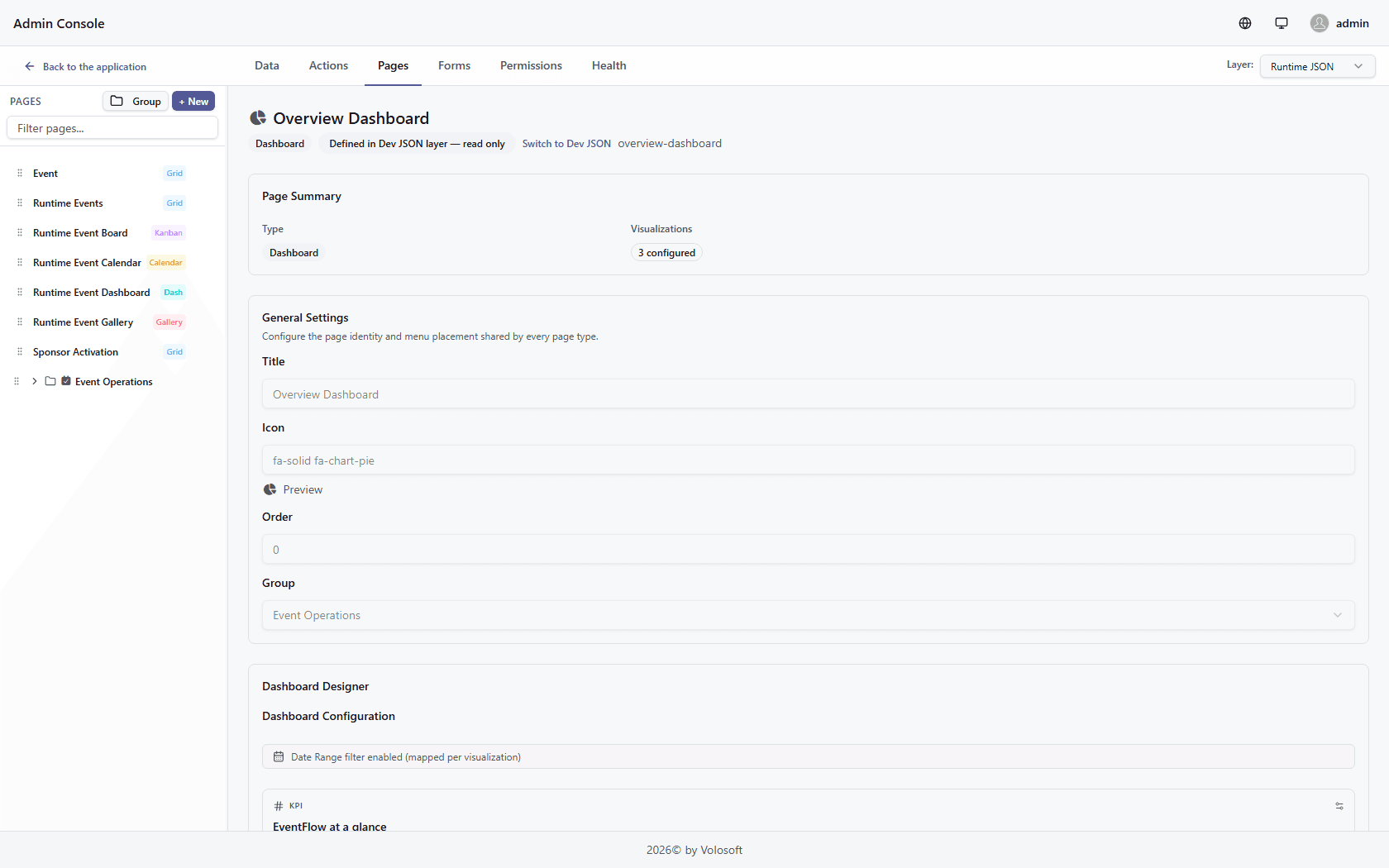
The dashboard screenshot below continues that same application story. It is another surface generated around the same underlying data, this time optimized for KPIs, counts, and current operational status.

This is where ABP Low-Code starts to feel less like a form generator and more like a runtime application layer: one model, many working screens, no second implementation track for each view type.
When low-code needs code
The real differentiator is not that ABP Low-Code can go fast. It is that speed does not require isolation from the application foundation.
When generated CRUD is not enough, you extend the same app instead of throwing the low-code layer away.
ABP Low-Code exposes a server-side Script API inside the same application model. That scripting surface can back:
- Custom endpoints when the UI needs an API-shaped response.
- Interceptors when create or update commands need validation or mutation.
- Event handlers when logic should react to runtime events.
- Background jobs when work should continue asynchronously.
- Background workers when operational logic should run on a schedule.
In this article, the visible proof happens to be GET /api/custom/eventflow/highlights. The next GIF focuses on an endpoint because it is the easiest proof surface to read. But the broader point is that endpoints are only one consumer of the same low-code scripting layer.
That hybrid model matters in both directions:
- Code-first ABP entities can be surfaced in low-code flows and runtime pages.
- Low-code-managed data and screens stay reachable from Script API actions, application services, repository queries, and custom endpoints.
- Teams do not lose architectural control just because they gained a faster authoring layer.
The next GIF steps into that Script API surface. In the same Admin Console, a script-backed low-code endpoint is opened, executed from the built-in test area, and its returned payload is shown immediately below so you can see runtime data flowing through an API-shaped contract.

The actual capability is the shared ABP application model behind it: script when runtime logic is enough, C# when typed application services and repository queries are the better fit.
This is the difference between "low-code as a shortcut" and "low-code as part of your application platform."
From code-first entity to generated page
The first direction is code-first to low-code. A code-first SponsorActivation entity checked into the ASP.NET Core project can still become a working runtime page without forking into a separate low-code-only model.
The code-first entity carries the same metadata that ABP Low-Code uses to generate the page:
[DynamicEntity(DefaultDisplayPropertyName = nameof(CompanyName))]
[DynamicEntityUI("Sponsor Activations")]
[DynamicEntityAttachments("application/pdf", "image/*", MaxFileCount = 4)]
public class SponsorActivation : DynamicEntityBase
{
    [Required]
    [DynamicPropertyUI(DisplayName = "Sponsor")]
    public string CompanyName { get; private set; }

    [Required]
    [EmailAddress]
    [DynamicPropertyUI(DisplayName = "Contact Email")]
    public string ContactEmail { get; private set; }

    public SponsorActivationStatus Status { get; set; }

    [DynamicForeignKey("EventFlow.Events.Event", "Title")]
    public Guid? EventId { get; set; }

    [DynamicForeignKey("Volo.Abp.Identity.IdentityUser", nameof(IdentityUser.UserName), ForeignAccess.View)]
    public Guid? OwnerUserId { get; set; }

    [DynamicPropertyType(EntityPropertyType.Money)]
    public decimal ActivationBudget { get; set; }

    [DynamicPropertyImageOptions("image/png", "image/jpeg")]
    public string? BrandLogo { get; set; }

    [DynamicPropertyFileOptions("application/pdf", ".pptx", ".docx")]
    public string? ActivationBrief { get; set; }
}
That class lives as normal C# source, gets migrated like the rest of the application, and is seeded with real records so the runtime page does not open as an empty shell.
Inside the designer, selecting the SponsorActivation entity auto-generates the page identity, binds the grid to the entity, and lands on a real runtime route at /dynamic/sponsor-activation. The generated surface includes sponsor, email, event lookup, owner lookup, budget, image, and file fields directly from the C# model.
The next GIF shows that bridge in action: a new code-first SponsorActivation entity is selected inside low-code, a page is generated from its metadata, and the resulting runtime route opens with the modeled fields already wired in.

The screenshot after that is the resulting page, not a placeholder. You are looking at the generated form that came from the C# entity definition, including lookups, budget handling, image upload, and file upload fields.

That is the distinction that matters: code-first ABP entities can move through low-code without becoming throwaway artifacts, and low-code-generated surfaces remain part of the same application story.
Low-code data stays reachable from C#
The bridge also works in the other direction. A normal ABP application service can query a low-code model through IRepository<DynamicEntity, Guid>, apply real filters, and combine that result with code-first aggregates.
The service behind the endpoint in the previous section looks like this:
public async Task<EventFlowLowCodeProofDto> GetHybridSummaryAsync()
{
    var liveSessionQuery = (await _dynamicEntityRepository
            .SetEntityName("EventFlow.Events.Session")
            .GetQueryableAsync())
        .Where("int(it[\"Status\"]) == @0", 2);

    var publicSessionQuery = liveSessionQuery
        .Where("bool(it[\"IsPublic\"]) == @0", true);

    var sponsorQuery = (await _sponsorActivationRepository.GetQueryableAsync())
        .Where(activation =>
            activation.Status == SponsorActivationStatus.Approved ||
            activation.Status == SponsorActivationStatus.Live);

    var liveSessionCount = await AsyncExecuter.CountAsync(liveSessionQuery);
    var publicSessionCount = await AsyncExecuter.CountAsync(publicSessionQuery);
    var activeSponsorActivationCount = await AsyncExecuter.CountAsync(sponsorQuery);

    return new EventFlowLowCodeProofDto
    {
        LiveSessionCount = liveSessionCount,
        PublicSessionCount = publicSessionCount,
        ActiveSponsorActivationCount = activeSponsorActivationCount
    };
}
Here, low-code-managed Session rows are filtered from C# with real Where(...) clauses, then combined with the typed SponsorActivation repository. The endpoint and dashboard are just one presentation surface for that shared ABP query path.
That is the ABP difference: low-code data stays reachable from code, and code-first entities stay reachable from low-code.
Why ABP Low-Code matters
The value is not novelty. It is a faster way to build real business applications without separating speed from the application foundation.
- Speed without replatforming. Runtime-managed screens reduce delivery time without moving the team onto a separate application stack.
- Governance without friction. Permissions, identity, auditability, and ABP platform foundations stay part of the story from day one.
- Extensibility without rewrite pressure. When custom behavior shows up, the same application can be extended instead of replacing the low-code output.
That is the core ABP Low-Code promise: faster delivery, still inside the application model you can extend.
Try it yourself
The public starting point for ABP Low-Code is ABP Studio.
The screenshot below is the exact toggle in the ABP Studio solution wizard where low-code runtime and designer support are enabled for a new ABP solution.

- Open ABP Studio and create a new solution.
- In the solution wizard, enable Include Low-Code runtime and designer.
- Complete the wizard, then run the generated backend and React UI from the solution.
- Sign in with the administrator account created for that solution.
- Open Admin Console to define runtime-managed entities, forms, pages, permissions, endpoints, and script actions.
- Switch to the application side to see those changes resolve live in the running app.