
13 KiB
//[doc-seo]
{
    "Description": "Configure the ABP React Low-Code runtime with configureLowCode, dynamic routes, dynamic menu items, generated pages, filters, forms, and export."
}
React Runtime
Preview: The React low-code runtime is part of the preview Low-Code System. Runtime APIs, generated routes, metadata contracts, and UI behavior may change before general availability.
The React runtime renders low-code pages from backend metadata. Generated low-code React applications include the required package and wiring.
{
  "dependencies": {
    "@volo/abp-react-lowcode": "<version>"
  }
}
Configure the Runtime
Call configureLowCode once during React startup. Pass the application's Axios instance, notifications, localization, navigation integration, and optional extension points.
import {
  configureLowCode,
  LowCodeLocalizationProvider,
} from '@volo/abp-react-lowcode';

function configureLowCodeRuntime(translate?: (key: string, defaultValue: string) => string) {
  configureLowCode({
    axios: api,
    onError: (err) => toast.error(err.message),
    onSuccess: (message) => toast.success(message),
    translate,
    navigate: (path) => router.navigate({ to: path }),
    validators: {
      customRule: (value) => value ? null : 'Value is required.',
    },
  });
}
Wrap the router with LowCodeLocalizationProvider when you want dynamic labels and validation messages to use the application localization pipeline.
<LowCodeLocalizationProvider translate={translate}>
  <RouterProvider router={router} />
</LowCodeLocalizationProvider>
Add Dynamic Routes
Use createDynamicRoutes in the TanStack Router tree.
import { createDynamicRoutes } from '@volo/abp-react-lowcode';

const dynamicEntityRoute = createDynamicRoutes(rootRoute, {
  beforeLoad: authGuard,
});

const routeTree = rootRoute.addChildren([
  indexRoute,
  accountRoute,
  identityRoute,
  dynamicEntityRoute,
]);
Runtime pages are then available under:
/dynamic/<page-name>
/dynamic/<page-name>/create
/dynamic/<page-name>/edit/<record-id>
/dynamic/<page-name>/<record-id>
createDynamicRoutes also accepts basePath when your application should mount dynamic pages somewhere other than /dynamic.
Generated low-code React templates do not register every possible dynamic page path in TanStack Router's module augmentation. Page names come from backend metadata, so keep dynamic low-code routes out of the static route augmentation or cast the dynamic path inside your router navigation adapter if your application uses strict typed navigation.
Add Dynamic Menu Items
Use useMenuItems to load menu items defined by low-code pages. Merge them with your static route configuration and apply the same permission checks used by the rest of the application.
import { useMenuItems } from '@volo/abp-react-lowcode';

const { data: dynamicMenuItems } = useMenuItems({
  enabled: isAuthenticated,
});
Each menu item includes its page name, display name, icon, order, grouping information, and children.
Page Types
The runtime includes built-in renderers for these page types:
| Page type | Runtime behavior |
|---|---|
dataGrid |
Searchable, sortable CRUD grid |
kanban |
Card board grouped by a configured property |
calendar |
Calendar view using date/time properties |
gallery |
Card/gallery view, optionally image-backed |
form |
Standalone form page |
dashboard |
Dashboard rows with chart, list, and number visualizations |
The generated data grid page includes:
- Search
- Sorting
- Paging
- Action menu
- Create and edit forms
- Permission-aware commands
- Display values for lookups
- File and image fields
- Export
- Type-aware filters

Forms
Create and edit forms are rendered from form metadata. Tabs, groups, labels, placeholders, controls, default values, validation rules, conditional form rules, and save actions come from the designer.
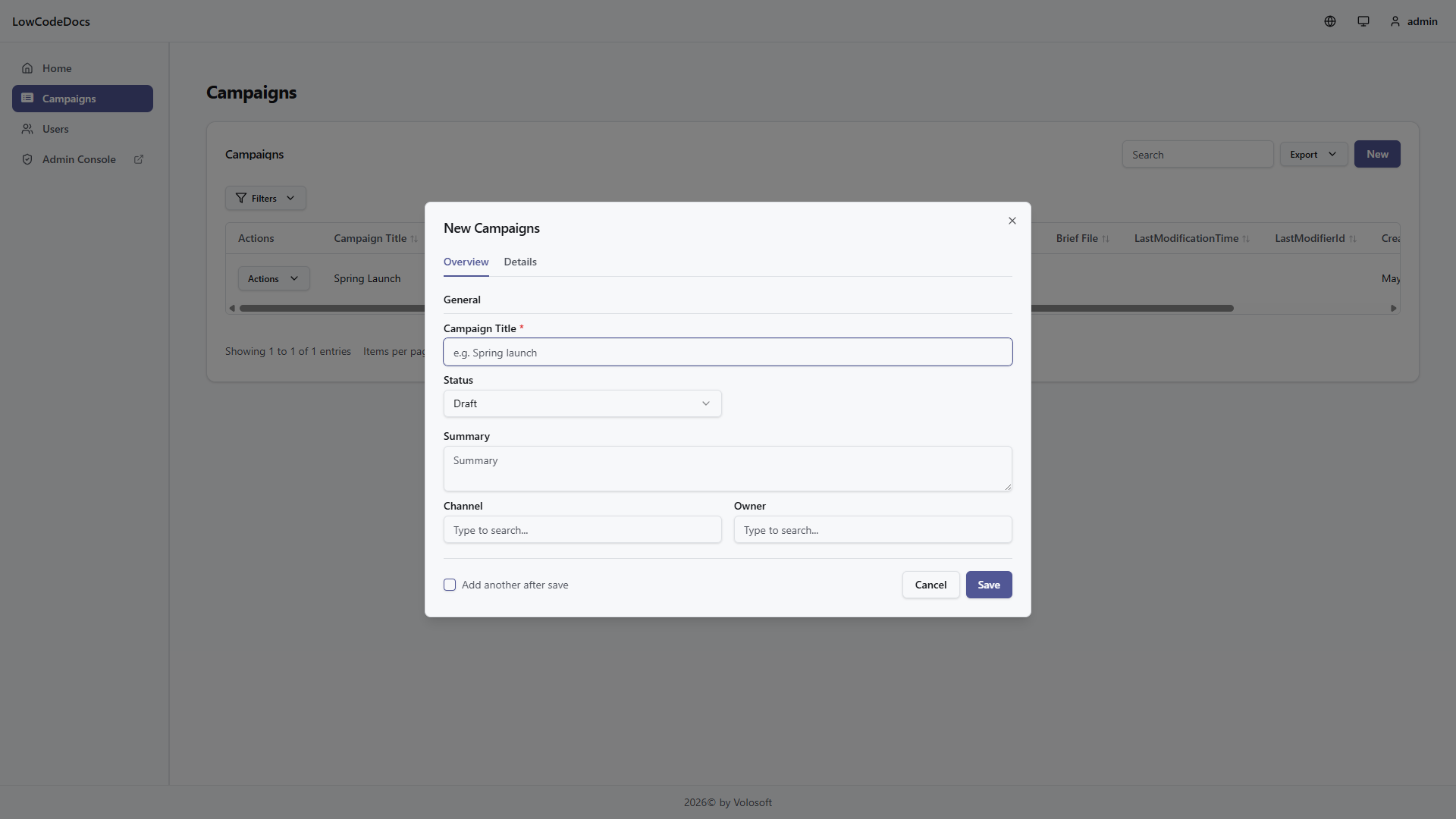
The runtime can render forms in a modal or on full pages. Full-page forms use the dynamic create/edit routes and the navigate callback configured in configureLowCode.
Filters
Filters are rendered as an ABP-style advanced filter area. The runtime shows all configured filters and only exposes operator UI where it is useful.

File and image filters use a single Has value concept. The value selector controls whether the filter is applied:
Alldoes not add a filter.Yesreturns records with a value.Noreturns records without a value.

The URL keeps the existing lcFilters query parameter shape. The runtime maps user-friendly filter choices to the existing backend FilterType values.
Export
The runtime export button opens a small menu with direct Excel and CSV actions. If the selected page has exportable file or image fields and bundle export is allowed in the Designer, the menu also shows Files (.zip). Direct export uses the current search, sorting, filters, and visible exportable columns from the page definition maintained in the Low-Code Designer. Use Export options when users need a different row, column, or file output scope.
Available options:
| Option | Behavior |
|---|---|
| Rows: all matching records | Exports all records matching the current search, filters, and sorting |
| Rows: current page | Exports only the current page using the runtime skipCount and maxResultCount |
| Columns: visible exportable columns | Exports columns that are both visible and exportable in the current page definition, ordered by Designer export order |
| Columns: all exportable fields | Exports page fields marked exportable in the Low-Code Designer, including fields that are hidden from the grid, ordered by Designer export order |
| File/image: file name | Writes the uploaded file name, or an empty value |
| File/image: metadata columns | Writes file name, content type, size, width, and height columns |
| File/image: download links | Writes file name, temporary download URL, link expiry, content type, size, width, height, and status columns |
Spreadsheet export stays tabular. It does not embed file bytes in cells. Use download-link columns when spreadsheet readers need a controlled way to fetch individual files, or use Files (.zip) when they need the actual file set. ZIP export contains manifest.csv and files under files/{recordId}/{fieldName}/{safeFileName}. The manifest reports missing, malformed, unlinked, skipped, and exported files.
The columns available in the runtime export dialog and their default order are controlled by the page-level Export Fields section in the Low-Code Designer. The runtime cannot use the dialog to bypass non-exportable fields.
The runtime first requests a short-lived token and then calls the Excel, CSV, or ZIP export endpoint. The export token is single-use and is bound to the current page, entity, tenant, child page, and foreign-access context. Temporary file links use separate short-lived tokens bound to the exported record field and blob. Text that looks like a spreadsheet formula is escaped in exported headers and cells. If a caller manually sends a non-exportable field name, the backend rejects the request.
| Endpoint | Description |
|---|---|
GET /api/low-code/pages/{pageName}/download-token |
Gets a short-lived token |
GET /api/low-code/pages/{pageName}/export/excel |
Downloads Excel |
GET /api/low-code/pages/{pageName}/export/csv |
Downloads CSV |
GET /api/low-code/pages/{pageName}/export/files |
Downloads a ZIP with selected file/image fields |
GET /api/low-code/pages/export/files/{token} |
Downloads one temporary file link from spreadsheet link mode |
Child and foreign-access pages use the matching /children/{childEntityName} and /foreign-access/{sourceEntityName} page endpoints.
Troubleshooting:
| Symptom | Likely cause |
|---|---|
| Invalid or expired download token | The token is single-use, expired, or was requested for a different page/context |
| Export row limit exceeded | Narrow the filters, export the current page, or increase LowCode:Export:MaxRows |
| File link expired | Re-run export; temporary file links are intentionally short-lived |
| File not exported marker | The file was missing, malformed, no longer linked to the exported record, or skipped by ZIP file count/size limits |
| ZIP bundle export disabled | Enable file bundle export for the page in the Low-Code Designer |
Files and Attachments
File and image fields use the page file endpoints. Record-level attachments use attachment endpoints when attachments are enabled for the entity.
| API | Purpose |
|---|---|
uploadPageFile |
Upload a file/image field value for a page field |
downloadPageFile |
Download a file/image field value |
buildPageFileDownloadUrl |
Build a URL for image previews or download links |
usePageFileObjectUrl |
Create and revoke an object URL for file previews |
useEntityAttachments |
Load record attachments |
useUploadEntityAttachments |
Upload one or more attachments |
useDeleteEntityAttachment |
Delete an attachment |
downloadEntityAttachment |
Download an attachment |
Uploads are still validated on the backend by the configured file size and content type rules. Downloads are checked against the owning record before returning the blob, and user-provided file names should be treated as display text only. Use usePageFileObjectUrl for previews so object URLs are revoked when the component unmounts.
Hooks and Components
The package exposes hooks for composing custom pages around the same backend API:
| API | Purpose |
|---|---|
usePageDefinitions, usePageDefinition |
Load page metadata |
useFormDefinition |
Load a named runtime form |
useDashboardDefinition, useDashboardData |
Load dashboard metadata and data |
usePageData, usePageRecord |
Load list data and a single record |
usePageCreate, usePageUpdate, usePageDelete |
Mutate records |
usePageLookup |
Load lookup/autocomplete options |
usePageExport |
Export current list state |
The package also exports renderer components such as DynamicPage, DynamicEntityPage, DynamicKanbanRenderer, DynamicCalendarRenderer, DynamicGalleryRenderer, DynamicDashboardRenderer, DynamicFormPageRenderer, DynamicFilters, DynamicEntityForm, and ForeignKeyAutocomplete.
Extension Points
configureLowCode supports these extension points:
| Option | Purpose |
|---|---|
validators |
Custom validation functions keyed by rule type |
pageRenderers |
Override built-in page renderers or add new page types |
fieldRenderers |
Override field rendering by field type or customRenderer |
translate |
Resolve low-code localization keys through the application |
navigate |
Connect full-page form navigation to the application router |
Custom page renderers receive PageRendererProps. Custom field renderers receive FieldRendererProps.
Runtime API Surface
The React runtime talks to these backend endpoints:
| Endpoint | Purpose |
|---|---|
GET /api/low-code/ui/menu-items |
Dynamic menu tree |
GET /api/low-code/ui/pages |
Page list |
GET /api/low-code/ui/pages/{pageName} |
Page summary metadata |
GET /api/low-code/ui/pages/{pageName}/ui-definition |
Runtime page UI definition |
GET /api/low-code/ui/forms/{formName} |
Runtime form definition |
GET /api/low-code/ui/dashboards/{pageName} |
Dashboard definition |
GET /api/low-code/pages/{pageName}/data |
Page data with search, filters, sorting, and paging |
GET /api/low-code/pages/{pageName}/data/{id} |
Single page record |
POST /api/low-code/pages/{pageName}/data |
Create record |
PUT /api/low-code/pages/{pageName}/data/{id} |
Update record |
DELETE /api/low-code/pages/{pageName}/data/{id} |
Delete record |
GET /api/low-code/pages/{pageName}/lookup/{fieldName} |
Lookup options |
POST /api/low-code/pages/{pageName}/files/{fieldName} |
Upload file/image field |
GET /api/low-code/pages/{pageName}/data/{id}/files/{fieldName}/{blobName} |
Download file/image field |
GET /api/low-code/pages/{pageName}/data/{id}/attachments |
List attachments |
POST /api/low-code/pages/{pageName}/data/{id}/attachments |
Upload attachment |
DELETE /api/low-code/pages/{pageName}/data/{id}/attachments/{attachmentId} |
Delete attachment |
POST /api/low-code/dashboards/{pageName}/data |
Dashboard visualization data |
Troubleshooting
If a generated page does not appear:
- Confirm the page exists in the designer and has a page name.
- Confirm the user has the generated page/entity permissions.
- Confirm
createDynamicRoutesis part of the router tree. - Confirm
useMenuItemsis enabled for authenticated users. - Confirm the backend host has run migrations and seed data.
If authentication loops back to the login page, check the generated OpenIddict clients and React root URL in appsettings.json.