
12 KiB
ABP Framework v3.1 RC.1 Has Been Released
Today, we are releasing the ABP Framework version 3.1 Release Candidate 1 (RC.1). The development cycle for this version was ~7 weeks. It was the longest development cycle for a feature version release ever. There were two main reasons of this long development cycle;
- We've switched to 4-weeks release cycle (was discussed in this issue).
- We've re-written the Angular service proxy generation system using the Angular schematics to make it more stable. There were some problems with the previous implementation.
This long development cycle brings a lot of new features, improvements and bug fixes. I will highlight the fundamental features and changes in this blog post.
About the Preview/Stable Version Cycle
As mentioned above, it is planned to release a new stable feature version (like 3.1, 3.2, 3.3...) in every 4-weeks.
In addition, we are starting to deploy a preview version 2-weeks before the stable versions for every feature/major releases.
Today, we've released 3.1.0-rc.1 as the first preview version. We may release more previews if it is needed until the stable 3.1.0 version.
The stable 3.1.0 version will be released on September 3, 2020. Next RC version, 3.2.0-rc.1 is planned for September 17, 2020 (2 weeks after the stable 3.1 version and 2 weeks before the stable 3.2 version).
We won't add new features to a version after publishing the preview version. We only will make bug fixes until the stable version. The new features being developed in this period will be available in the next version.
We will use
-rc.xsuffix (like3.1.0-rc.1and3.1.0-rc.2) for preview releases. However, we may also publish with-preview.xsuffix before RC (Release Candidate) releases, especially for major versions (like 4.x, 5.x...).
About the Nightly Builds
Don't confuse preview versions vs nightly builds. When we say preview, we are mentioning the preview system explained above.
We will continue to publish nightly builds for all the ABP Framework packages. Nightly pages are built from the development branch. You can refer to this document to learn how to use the nightly packages.
Get Started with the RC Versions
Please try the preview versions and provide feedback to us to release more stable versions. Please open an issue on the GitHub repository if you find a bug or want to give feedback.
Update the ABP CLI to the 3.1.0-rc.1
Since this is the first preview version, you need to upgrade the ABP CLI to the 3.1.0-rc.1 to be able to use the preview features:
dotnet tool update Volo.Abp.Cli -g --version 3.1.0-rc.1
New Solutions
The ABP.IO platform and the ABP CLI are compatible with the RC system. You can select the "preview" option on the download page or use the "--preview" parameter with the ABP CLI new command:
abp new Acme.BookStore --preview
This command will create a new project with the latest RC/Preview version. Whenever the stable version is released, you can switch to the stable version for your solution using the abp switch-to-stable command in the root folder of your solution.
Existing Solutions
If you already have a solution and want to use/test the latest RC/Preview version, use the abp switch-to-preview command in the root folder of your solution. You can return back to the latest stable using the abp switch-to-stable command later.
Note that the
abp switch-to-previewcommand was being used to switch to nightly builds before the v3.1. Now, you should use theabp switch-to-nightlyfor nightly builds.
What's New with the ABP Framework 3.1
Angular Service Proxies
ABP provides a system to generate Angular service proxies (with TypeScript) to consume the HTTP APIs of your application. Service proxy generation system has been completely re-written with the ABP Framework 3.1. The main goal was to build more stable and feature rich system that is better aligned with other ABP Framework features (like modularity).
See the documentation to learn more about the service proxy generation for Angular applications.
Authorization Code Flow for the Angular UI
We were using the resource owner password authentication flow for the Angular UI login page. We've implemented Authorization Code Flow for the Angular account module and made it default for new projects. With this change, the Angular application now redirects to the login page of the MVC UI which was implemented using the Identity Server 4. We also removed the client secret from the Angular side with this change.
Old behavior remains exist. If you want to switch to the new flow (which is recommended), follow the steps below:
-
Add
authorization_codeto theIdentityServerClientGrantTypestable in the database, for the client used by the Angular UI (theClientIdisYourProjectName_Appby default, in theIdentityServerClientstable). -
Add
http://localhost:4200toIdentityServerClientRedirectUrisandIdentityServerClientPostLogoutRedirectUristables for the same client. -
Set
RequireClientSecrettofalsein theIdentityServerClientstable for the same client.
ABP Commercial users can make these changes on the Identity Server Management UI.
- Change the
oAuthConfigsection in thesrc/environments/environment.tsfile of the Angular application.
You can take this new configuration as a reference. Main changes are;
- Added
responseTypeascode. - Added
redirectUri - Added
offline_accessto thescope. - Removed
oidc: falseoption. - Removed the client secret option.
Global Feature System
The new "Global Features" system allows to enable/disable features of an application or a module in a central point. It is especially useful if you want to use a module but don't want to bring all its features into your application. If the module was so designed, you can enable only the features you need.
When you disable a feature;
- The database tables related to that feature should not be included in the database.
- The HTTP APIs related to that feature should not be exposed. They returns 404 if they are directly requested.
So, the goal is that; when you disable a feature, it should behave like that feature doesn't exists in your system at all.
There is no way to enable/disable a global feature on runtime. You should decide it in the development time (remember, even database tables are not being created for disabled global features, so you can't enable it on runtime).
"Global Features" system is different than SaaS/multi-tenancy features, where you can enable/disable features for your tenants on runtime.
Assume that you are using the CMS Kit module (this module is in a very early stage) where you only want to enable the comment feature:
GlobalFeatureManager.Instance.Modules.CmsKit().Comments.Enable();
You can check if a feature was enabled:
GlobalFeatureManager.Instance.IsEnabled<CommentsFeature>();
Or you can add [RequiresGlobalFeature(...)] attribute to a controller/page to disable it if the related feature was disabled:
//...
[RequiresGlobalFeature(typeof(CommentsFeature))]
public class CommentController :  AbpController
{
    //...
}
See the issue #5061 until this is fully documented.
Social/External Logins
Implemented the infrastructure for social/external logins in the account module. So, now you can easily configure your application to support social/external logins by following the documentation. Once you configure a provider, a button will appear on the login page to use this provider.
The social logins will work as expected even if you are using the Angular UI, since the Angular UI uses the MVC login using the authorization code flow implemented with this new version (as explained above).
Forgot/Reset Password
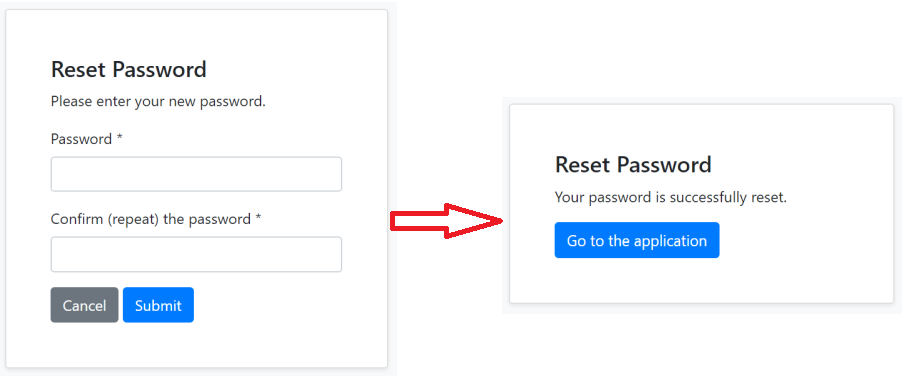
Implemented forgot password / password reset for the account module.
You can now enter your email address to get an email containing a password reset link:

When you click to the link, you are redirected to a password reset page to determine your new password:
External Login System
The standard Social/External Login system (like Facebook login) works via OpenID Connect. That means the user is redirected to the login provider, logins there and redirected to your application.
While this is pretty nice for most scenarios, sometimes you want a simpler external login mechanism: User enters username & password in your own application's login form and you check the username & password from another source, not from your own database.
ABP v3.1 introduces an External Login System to check username & password from any source (from an external database, a REST service or from an LDAP / Active Directory server).
You can check the issue #4977 until it is fully documented.
We've implemented LDAP authentication for the ABP Commercial, using this new login extension system (see the ABP Commercial section below).
User Security Logs
The new Security Log System (of the Identity module) automatically logs all authentication related operations (login, logout, change password...) to a AbpSecurityLogs table in the database.
New BLOB Storage Providers
Implemented AWS and Aliyun providers for the BLOB storing system with this version.
Other Features / Highlights
Here, some other highlights from this release;
- UOW level caching system #4796
- Refactored the console application template to better integrate to the host builder #5006
- Volo.Abp.Ldap package now supports multi-tenancy.
- Introduce BasicAggregateRoot base class
- Try to set GUID Id in the InsertAsync method of the EF Core repository
- Added GetPagedListAsync methods to the repository
- Configure Prettier for the solutions
- Define new layout hooks: before page content & after page content
- Upgraded to AutoMapper 10.
- Allow to put static resources (js, css... files) under the Components folder for ASP.NET Core MVC UI.
What's New with the ABP Commercial v3.1
Security Logs UI
TODO
LDAP Authentication
TODO (with settings UI)
Others
- Social logins and authorization code flow are also implemented for the ABP Commercial, just as described above.
- Allow to lock a user for a given period of time (locked user can not login to the application).
- Angular UI code generate has been re-written using the Angular Schematics for the ABP Suite.