# [GrapesJS](http://grapesjs.com)
> ⚠️ **Warning:** We are in the process of moving to a monorepo.
[](https://github.com/GrapesJS/grapesjs/actions)
[](https://discord.gg/QAbgGXq)
[](https://cdnjs.com/libraries/grapesjs)
[](https://www.npmjs.com/package/grapesjs)
> If you looking to embed the [Studio](https://app.grapesjs.com/studio) editor in your application, we now offer the [Studio SDK](https://app.grapesjs.com/dashboard/sdk/licenses?ref=repo-readme), a ready-to-use visual builder that's easy to embed in external applications, with GrapesJS team support included.
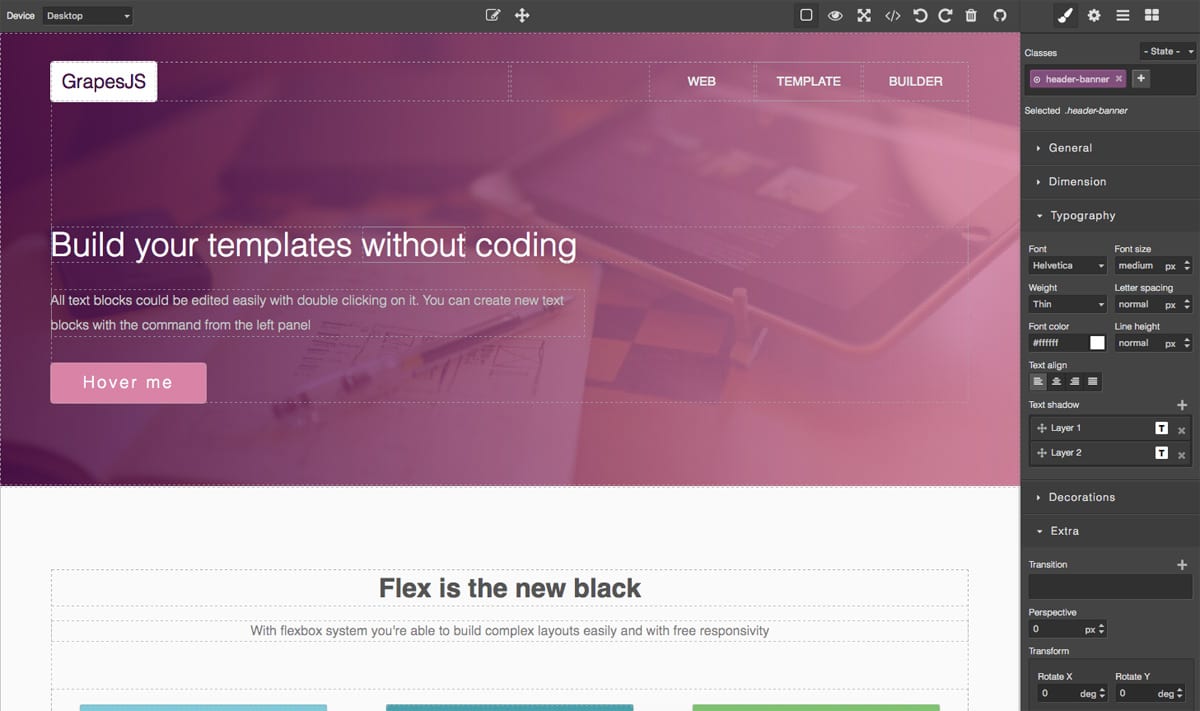
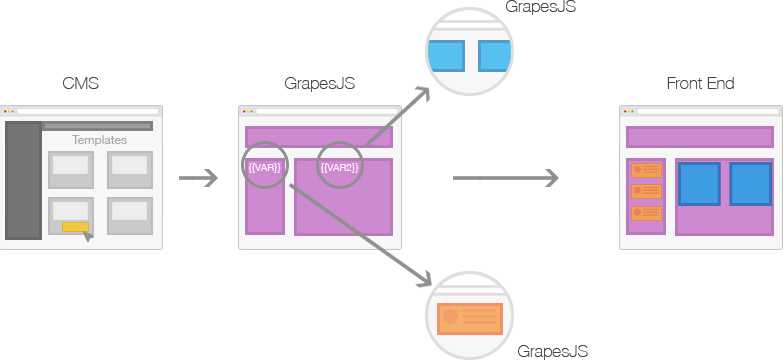
GrapesJS is a free and open source Web Builder Framework which helps building HTML templates, faster and easily, to be delivered in sites, newsletters or mobile apps. Mainly, GrapesJS was designed to be used inside a [CMS] to speed up the creation of dynamic templates. To better understand this concept check the image below
Generally any 'template system', that you'd find in various applications like CMS, is composed by the **structure** (HTML), **style** (CSS) and **variables**, which are then replaced with other templates and contents on server-side and rendered on client.
This demos show examples of what is possible to achieve:
Webpage Demo - http://grapesjs.com/demo.html
Newsletter Demo - http://grapesjs.com/demo-newsletter-editor.html
## Table of contents
- [Features](#features)
- [Download](#download)
- [Usage](#usage)
- [Development](#development)
- [Documentation](#documentation)
- [API](#api)
- [Testing](#testing)
- [Plugins](#plugins)
- [Support](#support)
- [Changelog](https://github.com/GrapesJS/grapesjs/releases)
- [Contributing](https://github.com/GrapesJS/grapesjs/blob/master/CONTRIBUTING.md)
- [License](#license)
## Features
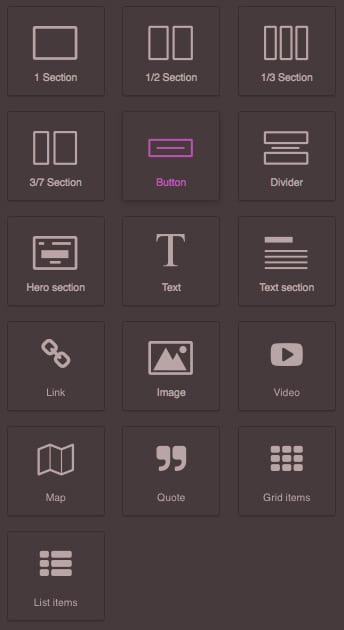
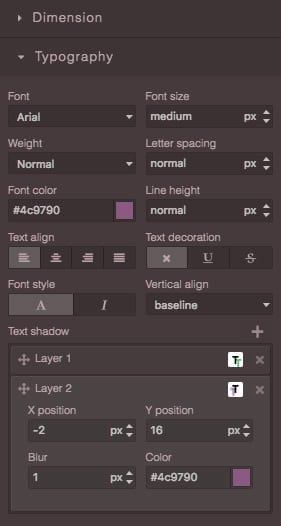
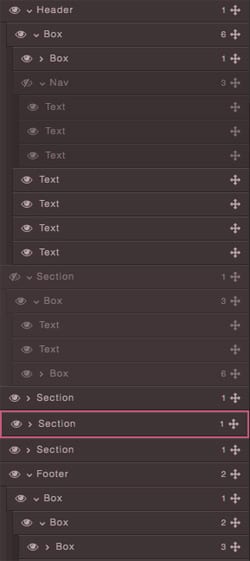
| Blocks | Style Manager | Layer Manager |
| ---------------------------------------------------------------------------------------------------------------------------------------- | ------------------------------------------------------------------------------------------------------------------------------------- | -------------------------------------------------------------------------------------------------------------------------------------- |
| | | |
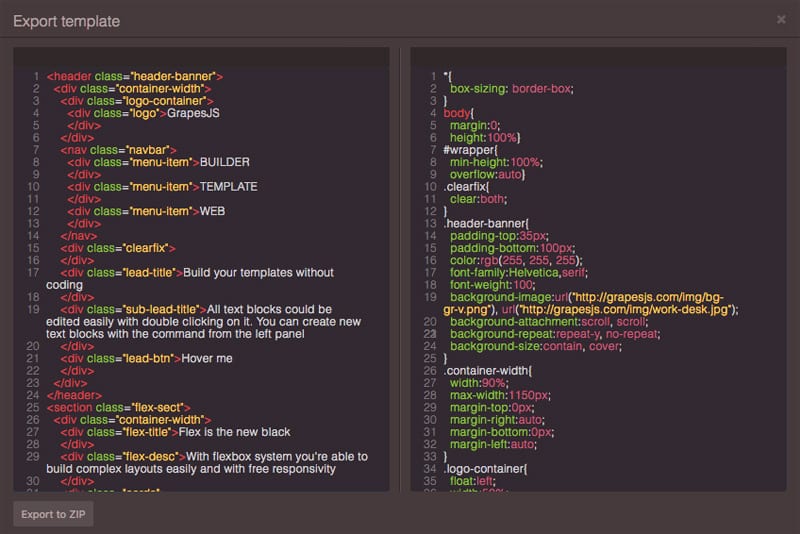
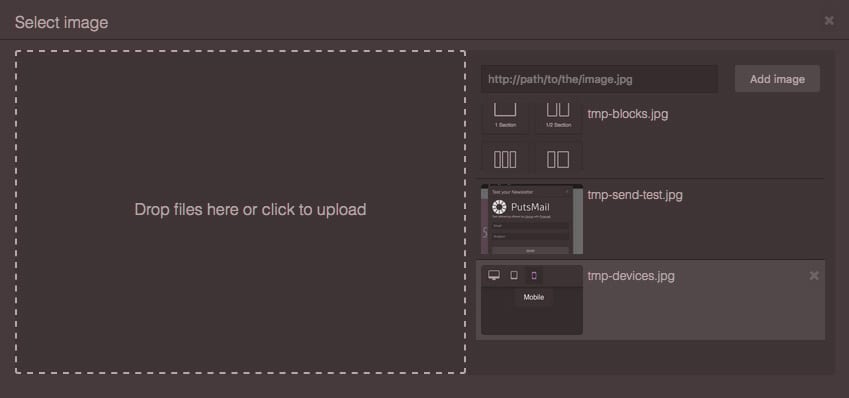
| Code Viewer | Asset Manager |
| -------------------------------------------------------------------------------------------------------------------------------- | -------------------------------------------------------------------------------------------------------------------------------------- |
| | |
- Local and remote storage
- Default built-in commands (basically for creating and managing different components)
## Download
- CDNs
- UNPKG (resolves to the latest version)
- `https://unpkg.com/grapesjs`
- `https://unpkg.com/grapesjs/dist/css/grapes.min.css`
- CDNJS (replace `X.X.X` with the current version)
- `https://cdnjs.cloudflare.com/ajax/libs/grapesjs/X.X.X/grapes.min.js`
- `https://cdnjs.cloudflare.com/ajax/libs/grapesjs/X.X.X/css/grapes.min.css`
- NPM
- `npm i grapesjs`
- GIT
- `git clone https://github.com/GrapesJS/grapesjs.git`
For the development purpose you should follow instructions below.
## Usage
```html
```
For a more practical example I'd suggest looking up the code inside this demo: http://grapesjs.com/demo.html
## Development
Follow the [Contributing Guide](https://github.com/GrapesJS/grapesjs/blob/master/CONTRIBUTING.md).
## Documentation
Check the getting started guide here: [Documentation]
## API
API References could be found here: [API-Reference]
## Testing
```sh
$ pnpm test
```
## Plugins
[Official Plugins](https://github.com/orgs/GrapesJS/repositories?q=-repo%3Agrapesjs%2Fgrapesjs&type=source) | [Community Plugins](https://github.com/topics/grapesjs-plugin)
### Wrappers
- [@grapesjs/react](https://github.com/GrapesJS/react) - GrapesJS wrapper for React that allows you to build custom and declarative UI for your editor.
### Extensions
- [grapesjs-plugin-export](https://github.com/GrapesJS/export) - Export GrapesJS templates in a zip archive
- [grapesjs-plugin-filestack](https://github.com/GrapesJS/filestack) - Add Filestack uploader in Asset Manager
- [grapesjs-plugin-ckeditor](https://github.com/GrapesJS/ckeditor) - Replaces the built-in RTE with CKEditor
- [grapesjs-tui-image-editor](https://github.com/GrapesJS/tui-image-editor) - GrapesJS TOAST UI Image Editor
- [grapesjs-blocks-basic](https://github.com/GrapesJS/blocks-basic) - Basic set of blocks
- [grapesjs-plugin-forms](https://github.com/GrapesJS/components-forms) - Set of form components and blocks
- [grapesjs-navbar](https://github.com/GrapesJS/components-navbar) - Simple navbar component
- [grapesjs-component-countdown](https://github.com/GrapesJS/components-countdown) - Simple countdown component
- [grapesjs-style-gradient](https://github.com/GrapesJS/style-gradient) - Add `gradient` type input to the Style Manager
- [grapesjs-style-filter](https://github.com/GrapesJS/style-filter) - Add `filter` type input to the Style Manager
- [grapesjs-style-bg](https://github.com/GrapesJS/style-bg) - Full-stack background style property type, with the possibility to add images, colors, and gradients
- [grapesjs-blocks-flexbox](https://github.com/GrapesJS/blocks-flexbox) - Add the flexbox block
- [grapesjs-lory-slider](https://github.com/GrapesJS/components-lory) - Slider component by using [lory](https://github.com/meandmax/lory)
- [grapesjs-tabs](https://github.com/GrapesJS/components-tabs) - Simple tabs component
- [grapesjs-tooltip](https://github.com/GrapesJS/components-tooltip) - Simple, CSS only, tooltip component for GrapesJS
- [grapesjs-custom-code](https://github.com/GrapesJS/components-custom-code) - Embed custom code
- [grapesjs-touch](https://github.com/GrapesJS/touch) - Enable touch support
- [grapesjs-indexeddb](https://github.com/GrapesJS/storage-indexeddb) - Storage wrapper for IndexedDB
- [grapesjs-firestore](https://github.com/GrapesJS/storage-firestore) - Storage wrapper for [Cloud Firestore](https://firebase.google.com/docs/firestore)
- [grapesjs-parser-postcss](https://github.com/GrapesJS/parser-postcss) - Custom CSS parser for GrapesJS by using [PostCSS](https://github.com/postcss/postcss)
- [grapesjs-typed](https://github.com/GrapesJS/components-typed) - Typed component made by wrapping Typed.js library
- [grapesjs-ui-suggest-classes](https://github.com/silexlabs/grapesjs-ui-suggest-classes) - Enable auto-complete of classes in the SelectorManager UI
- [grapesjs-fonts](https://github.com/silexlabs/grapesjs-fonts) - Custom Fonts plugin, adds a UI to manage fonts in websites
- [grapesjs-symbols](https://github.com/silexlabs/grapesjs-symbols) - Symbols plugin to reuse elements in a website and accross pages
- [grapesjs-click](https://github.com/bgrand-ch/grapesjs-click) - Grab and drop blocks and components with click (no more drag-and-drop)
- [grapesjs-float](https://github.com/bgrand-ch/grapesjs-float) - Anchor a floating element next to another element (selected component, ...)
### Presets
- [grapesjs-preset-webpage](https://github.com/GrapesJS/preset-webpage) - Webpage Builder
- [grapesjs-preset-newsletter](https://github.com/GrapesJS/preset-newsletter) - Newsletter Builder
- [grapesjs-mjml](https://github.com/GrapesJS/mjml) - Newsletter Builder with MJML components
Find out more about plugins here: [Creating plugins](https://grapesjs.com/docs/modules/Plugins.html)
## Support
If you like the project and you wish to see it grow, please consider supporting us with a donation of your choice or become a backer/sponsor via [Open Collective](https://opencollective.com/grapesjs)
[](https://paypal.me/grapesjs)
[](https://commerce.coinbase.com/checkout/fc90b940-558d-408b-a166-28a823c98173)
[](https://www.browserstack.com)
Thanks to [BrowserStack](https://www.browserstack.com) for providing us browser testing services
## License
BSD 3-clause
[Documentation]: https://grapesjs.com/docs/
[API-Reference]: https://grapesjs.com/docs/api/
[CMS]: https://en.wikipedia.org/wiki/Content_management_system
 |
|  |
|  |
| Code Viewer | Asset Manager |
| -------------------------------------------------------------------------------------------------------------------------------- | -------------------------------------------------------------------------------------------------------------------------------------- |
|
|
| Code Viewer | Asset Manager |
| -------------------------------------------------------------------------------------------------------------------------------- | -------------------------------------------------------------------------------------------------------------------------------------- |
|  |
|  |
- Local and remote storage
- Default built-in commands (basically for creating and managing different components)
## Download
- CDNs
- UNPKG (resolves to the latest version)
- `https://unpkg.com/grapesjs`
- `https://unpkg.com/grapesjs/dist/css/grapes.min.css`
- CDNJS (replace `X.X.X` with the current version)
- `https://cdnjs.cloudflare.com/ajax/libs/grapesjs/X.X.X/grapes.min.js`
- `https://cdnjs.cloudflare.com/ajax/libs/grapesjs/X.X.X/css/grapes.min.css`
- NPM
- `npm i grapesjs`
- GIT
- `git clone https://github.com/GrapesJS/grapesjs.git`
For the development purpose you should follow instructions below.
## Usage
```html
```
For a more practical example I'd suggest looking up the code inside this demo: http://grapesjs.com/demo.html
## Development
Follow the [Contributing Guide](https://github.com/GrapesJS/grapesjs/blob/master/CONTRIBUTING.md).
## Documentation
Check the getting started guide here: [Documentation]
## API
API References could be found here: [API-Reference]
## Testing
```sh
$ pnpm test
```
## Plugins
[Official Plugins](https://github.com/orgs/GrapesJS/repositories?q=-repo%3Agrapesjs%2Fgrapesjs&type=source) | [Community Plugins](https://github.com/topics/grapesjs-plugin)
### Wrappers
- [@grapesjs/react](https://github.com/GrapesJS/react) - GrapesJS wrapper for React that allows you to build custom and declarative UI for your editor.
### Extensions
- [grapesjs-plugin-export](https://github.com/GrapesJS/export) - Export GrapesJS templates in a zip archive
- [grapesjs-plugin-filestack](https://github.com/GrapesJS/filestack) - Add Filestack uploader in Asset Manager
- [grapesjs-plugin-ckeditor](https://github.com/GrapesJS/ckeditor) - Replaces the built-in RTE with CKEditor
- [grapesjs-tui-image-editor](https://github.com/GrapesJS/tui-image-editor) - GrapesJS TOAST UI Image Editor
- [grapesjs-blocks-basic](https://github.com/GrapesJS/blocks-basic) - Basic set of blocks
- [grapesjs-plugin-forms](https://github.com/GrapesJS/components-forms) - Set of form components and blocks
- [grapesjs-navbar](https://github.com/GrapesJS/components-navbar) - Simple navbar component
- [grapesjs-component-countdown](https://github.com/GrapesJS/components-countdown) - Simple countdown component
- [grapesjs-style-gradient](https://github.com/GrapesJS/style-gradient) - Add `gradient` type input to the Style Manager
- [grapesjs-style-filter](https://github.com/GrapesJS/style-filter) - Add `filter` type input to the Style Manager
- [grapesjs-style-bg](https://github.com/GrapesJS/style-bg) - Full-stack background style property type, with the possibility to add images, colors, and gradients
- [grapesjs-blocks-flexbox](https://github.com/GrapesJS/blocks-flexbox) - Add the flexbox block
- [grapesjs-lory-slider](https://github.com/GrapesJS/components-lory) - Slider component by using [lory](https://github.com/meandmax/lory)
- [grapesjs-tabs](https://github.com/GrapesJS/components-tabs) - Simple tabs component
- [grapesjs-tooltip](https://github.com/GrapesJS/components-tooltip) - Simple, CSS only, tooltip component for GrapesJS
- [grapesjs-custom-code](https://github.com/GrapesJS/components-custom-code) - Embed custom code
- [grapesjs-touch](https://github.com/GrapesJS/touch) - Enable touch support
- [grapesjs-indexeddb](https://github.com/GrapesJS/storage-indexeddb) - Storage wrapper for IndexedDB
- [grapesjs-firestore](https://github.com/GrapesJS/storage-firestore) - Storage wrapper for [Cloud Firestore](https://firebase.google.com/docs/firestore)
- [grapesjs-parser-postcss](https://github.com/GrapesJS/parser-postcss) - Custom CSS parser for GrapesJS by using [PostCSS](https://github.com/postcss/postcss)
- [grapesjs-typed](https://github.com/GrapesJS/components-typed) - Typed component made by wrapping Typed.js library
- [grapesjs-ui-suggest-classes](https://github.com/silexlabs/grapesjs-ui-suggest-classes) - Enable auto-complete of classes in the SelectorManager UI
- [grapesjs-fonts](https://github.com/silexlabs/grapesjs-fonts) - Custom Fonts plugin, adds a UI to manage fonts in websites
- [grapesjs-symbols](https://github.com/silexlabs/grapesjs-symbols) - Symbols plugin to reuse elements in a website and accross pages
- [grapesjs-click](https://github.com/bgrand-ch/grapesjs-click) - Grab and drop blocks and components with click (no more drag-and-drop)
- [grapesjs-float](https://github.com/bgrand-ch/grapesjs-float) - Anchor a floating element next to another element (selected component, ...)
### Presets
- [grapesjs-preset-webpage](https://github.com/GrapesJS/preset-webpage) - Webpage Builder
- [grapesjs-preset-newsletter](https://github.com/GrapesJS/preset-newsletter) - Newsletter Builder
- [grapesjs-mjml](https://github.com/GrapesJS/mjml) - Newsletter Builder with MJML components
Find out more about plugins here: [Creating plugins](https://grapesjs.com/docs/modules/Plugins.html)
## Support
If you like the project and you wish to see it grow, please consider supporting us with a donation of your choice or become a backer/sponsor via [Open Collective](https://opencollective.com/grapesjs)
[](https://paypal.me/grapesjs)
[](https://commerce.coinbase.com/checkout/fc90b940-558d-408b-a166-28a823c98173)
|
- Local and remote storage
- Default built-in commands (basically for creating and managing different components)
## Download
- CDNs
- UNPKG (resolves to the latest version)
- `https://unpkg.com/grapesjs`
- `https://unpkg.com/grapesjs/dist/css/grapes.min.css`
- CDNJS (replace `X.X.X` with the current version)
- `https://cdnjs.cloudflare.com/ajax/libs/grapesjs/X.X.X/grapes.min.js`
- `https://cdnjs.cloudflare.com/ajax/libs/grapesjs/X.X.X/css/grapes.min.css`
- NPM
- `npm i grapesjs`
- GIT
- `git clone https://github.com/GrapesJS/grapesjs.git`
For the development purpose you should follow instructions below.
## Usage
```html
```
For a more practical example I'd suggest looking up the code inside this demo: http://grapesjs.com/demo.html
## Development
Follow the [Contributing Guide](https://github.com/GrapesJS/grapesjs/blob/master/CONTRIBUTING.md).
## Documentation
Check the getting started guide here: [Documentation]
## API
API References could be found here: [API-Reference]
## Testing
```sh
$ pnpm test
```
## Plugins
[Official Plugins](https://github.com/orgs/GrapesJS/repositories?q=-repo%3Agrapesjs%2Fgrapesjs&type=source) | [Community Plugins](https://github.com/topics/grapesjs-plugin)
### Wrappers
- [@grapesjs/react](https://github.com/GrapesJS/react) - GrapesJS wrapper for React that allows you to build custom and declarative UI for your editor.
### Extensions
- [grapesjs-plugin-export](https://github.com/GrapesJS/export) - Export GrapesJS templates in a zip archive
- [grapesjs-plugin-filestack](https://github.com/GrapesJS/filestack) - Add Filestack uploader in Asset Manager
- [grapesjs-plugin-ckeditor](https://github.com/GrapesJS/ckeditor) - Replaces the built-in RTE with CKEditor
- [grapesjs-tui-image-editor](https://github.com/GrapesJS/tui-image-editor) - GrapesJS TOAST UI Image Editor
- [grapesjs-blocks-basic](https://github.com/GrapesJS/blocks-basic) - Basic set of blocks
- [grapesjs-plugin-forms](https://github.com/GrapesJS/components-forms) - Set of form components and blocks
- [grapesjs-navbar](https://github.com/GrapesJS/components-navbar) - Simple navbar component
- [grapesjs-component-countdown](https://github.com/GrapesJS/components-countdown) - Simple countdown component
- [grapesjs-style-gradient](https://github.com/GrapesJS/style-gradient) - Add `gradient` type input to the Style Manager
- [grapesjs-style-filter](https://github.com/GrapesJS/style-filter) - Add `filter` type input to the Style Manager
- [grapesjs-style-bg](https://github.com/GrapesJS/style-bg) - Full-stack background style property type, with the possibility to add images, colors, and gradients
- [grapesjs-blocks-flexbox](https://github.com/GrapesJS/blocks-flexbox) - Add the flexbox block
- [grapesjs-lory-slider](https://github.com/GrapesJS/components-lory) - Slider component by using [lory](https://github.com/meandmax/lory)
- [grapesjs-tabs](https://github.com/GrapesJS/components-tabs) - Simple tabs component
- [grapesjs-tooltip](https://github.com/GrapesJS/components-tooltip) - Simple, CSS only, tooltip component for GrapesJS
- [grapesjs-custom-code](https://github.com/GrapesJS/components-custom-code) - Embed custom code
- [grapesjs-touch](https://github.com/GrapesJS/touch) - Enable touch support
- [grapesjs-indexeddb](https://github.com/GrapesJS/storage-indexeddb) - Storage wrapper for IndexedDB
- [grapesjs-firestore](https://github.com/GrapesJS/storage-firestore) - Storage wrapper for [Cloud Firestore](https://firebase.google.com/docs/firestore)
- [grapesjs-parser-postcss](https://github.com/GrapesJS/parser-postcss) - Custom CSS parser for GrapesJS by using [PostCSS](https://github.com/postcss/postcss)
- [grapesjs-typed](https://github.com/GrapesJS/components-typed) - Typed component made by wrapping Typed.js library
- [grapesjs-ui-suggest-classes](https://github.com/silexlabs/grapesjs-ui-suggest-classes) - Enable auto-complete of classes in the SelectorManager UI
- [grapesjs-fonts](https://github.com/silexlabs/grapesjs-fonts) - Custom Fonts plugin, adds a UI to manage fonts in websites
- [grapesjs-symbols](https://github.com/silexlabs/grapesjs-symbols) - Symbols plugin to reuse elements in a website and accross pages
- [grapesjs-click](https://github.com/bgrand-ch/grapesjs-click) - Grab and drop blocks and components with click (no more drag-and-drop)
- [grapesjs-float](https://github.com/bgrand-ch/grapesjs-float) - Anchor a floating element next to another element (selected component, ...)
### Presets
- [grapesjs-preset-webpage](https://github.com/GrapesJS/preset-webpage) - Webpage Builder
- [grapesjs-preset-newsletter](https://github.com/GrapesJS/preset-newsletter) - Newsletter Builder
- [grapesjs-mjml](https://github.com/GrapesJS/mjml) - Newsletter Builder with MJML components
Find out more about plugins here: [Creating plugins](https://grapesjs.com/docs/modules/Plugins.html)
## Support
If you like the project and you wish to see it grow, please consider supporting us with a donation of your choice or become a backer/sponsor via [Open Collective](https://opencollective.com/grapesjs)
[](https://paypal.me/grapesjs)
[](https://commerce.coinbase.com/checkout/fc90b940-558d-408b-a166-28a823c98173)

