GrapesJS is a free and open source Web Template Editor for building HTML templates to be used inside sites, webapps, newsletters or anything else related with HTML.
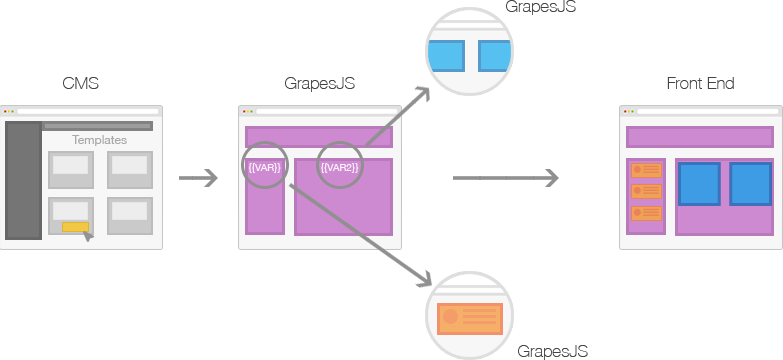
Mainly GrapesJS was designed to be used inside a [CMS] to speed up creation of dynamic templates. To better understand this concept check the image below
Generally any 'template system', that you can find in various applications like CMS, is composed by the **structure** (HTML), **style** (CSS) and **variables**, which are then replaced with other templates and contents on server-side and rendered soon on client.
This demo shows an example of what is possible to achieve: http://grapesjs.com/demo.html
## Features
* Style Manager, for component styling
* Layer Manager, that comes handy with nested elements
* Code Viewer
* Asset Manager, for uploading and managing images
* Local and remote storage
* Default built-in commands (basically for creating and managing different components)
## Installation
You can get GrapesJS with `bower install grapesjs` or via `git clone https://github.com/artf/grapesjs.git` to directly use it. For development purpose you should follow instructions below.
## Development
GrapesJS uses [RequireJS](http://requirejs.org/) to organize its files inside `src` folder and [Grunt](http://gruntjs.com/) for build them to `dist`
Clone the repository and enter inside the folder
```sh
$ npm install -g grunt-cli
$ git clone https://github.com/artf/grapesjs.git
$ cd grapesjs
```
Install all necessary dependencies
```sh
$ npm install
```
Build GrapesJS
```sh
$ npm run build
```
Launch server, which also gonna watch some files, and try out the demo on `localhost:8000`
```sh
$ npm run dev
```
Tests are already available inside browser on `localhost:8000/test`
If [Grunt](http://gruntjs.com/) is already installed globally you could change the port by using `grunt dev --port 9000`
## Usage
JQuery is the only hard dependency so you have to include it before use GrapesJS.
```html
```
After that include scripts from GrapesJS with all your configurations and render it.
```html
```
Unfortunately with the configuration above you wouldn't see a lot. This because GrapesJS it self is simply empty, adding panels, buttons and other stuff will be your job (actually it's not empty but you need buttons to show them up).
The section below will explain some basic configurations but for a more practical example I suggest to look up the code inside this demo: http://grapesjs.com/demo.html
Documentation is under construction here: [wiki]
## Configuration
For now I only show up some general settings, for more details check source or demo. Examples will be available soon
```js
var config = {
// Prefix to use inside local storage name
storagePrefix: 'wte-',
// Where to render editor (eg. #myId)
container: '',
// Enable/Disable the possibility to copy (ctrl + c) and paste (ctrl + v) elements
copyPaste: true,
// Enable/Disable undo manager
undoManager: true,
//Indicates which storage to use. Available: local | remote | none
storageType: 'local',
//Configurations for Asset Manager (check src/asset_manager/config/config.js)
assetManager: {},
//Configurations for Style Manager (check src/style_manager/config/config.js)
styleManager: {},
//Configurations for Layers (check src/navigator/config/config.js)
layers: {},
//Configurations for Storage Manager (check src/storage_manager/config/config.js)
storageManager: {},
//Configurations for Rich Text Editor (check src/rich_text_editor/config/config.js)
rte: {},
//Configurations for Components (check src/dom_components/config/config.js)
components: {},
//Configurations for Panels (check src/panels/config/config.js)
panels: {},
//Configurations for Commands (check src/commands/config/config.js)
commands: {},
};
```
## API
At the moment `render()` is the only available method but others will be public very soon...
## Testing
**ATTENTION: tests are pretty far away from being complete**
Tests are run by [PhantomJS](http://phantomjs.org/) using [Mocha](https://mochajs.org/) (with [Chai](http://chaijs.com/) and [Sinon](http://sinonjs.org/) help)
```sh
$ npm run test
```
## Todos before beta release
* **Class Manager** (*in development*) - Ability to assign different classes to components and style them (because CSS with only ids is pretty much a pain)
* **Breakpoint Manager** - Resize canvas according to breakpoints established by user (in simple terms, for responsive templates). Will be put into development immediately after Class Manager
* **Style Manager improvements** - Mainly `stack` type is not yet complete
## Acknowledgements
GrapesJS is built on top of this amazing open source projects:
* [Backbone] - gives Backbone to web applications
* [Backbone.Undo] - a simple Backbone undo-manager
* [Keymaster] - keyboard shortcuts
* [CodeMirror] - versatile text editor
* [Spectrum] - no hassle colorpicker
* [FontAwesome] - the iconic font and CSS framework
## Support
A star/fork is already a huge motivational support and I'd like to thank all of you for that, but if you want to contribute the project economically and you have this possibility you could use the link below :heart:
[](https://paypal.me/grapesjs)
## Contributing
Any kind of help is welcome. At the moment there is no generic guidelines so use usual pull requests and push to `dev` branch
## License
BSD 3-clause
[Backbone]:
[Backbone.Undo]:
[Keymaster]:
[CodeMirror]:
[Spectrum]:
[FontAwesome]:
[wiki]:
[CMS]: