GrapesJS is a free and open source Web Template Builder which helps you building HTML templates to be used inside sites, newsletters and mobile apps.
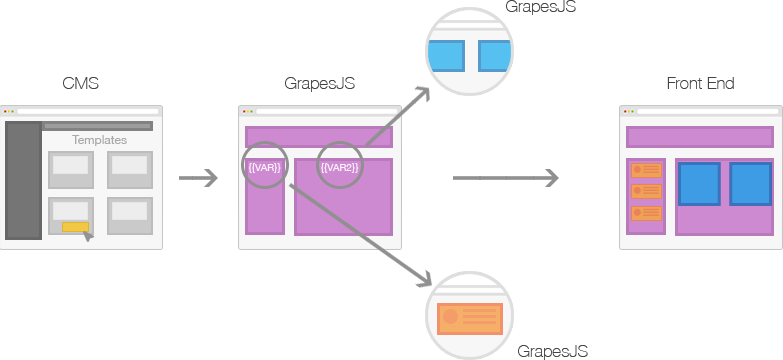
Mainly GrapesJS was designed to be used inside a [CMS] to speed up a creation of dynamic templates. To better understand this concept check the image below
Generally any 'template system', that you'd find in various applications like CMS, is composed by the **structure** (HTML), **style** (CSS) and **variables**, which are then replaced with other templates and contents on server-side and rendered on client.
This demo shows an example of what is possible to achieve: http://grapesjs.com/demo.html
## Features
* Style Manager, for component styling
* Layer Manager, that comes handy with nested elements
* Code Viewer
* Asset Manager, for uploading and managing images
* Local and remote storage
* Default built-in commands (basically for creating and managing different components)
## Installation
You can get GrapesJS with `bower install grapesjs` or via `git clone https://github.com/artf/grapesjs.git` to directly use it. For development purpose you should follow instructions below.
## Development
GrapesJS uses [RequireJS](http://requirejs.org/) to organize its files inside `src` folder and [Grunt](http://gruntjs.com/) for build them to `dist`
Clone the repository and enter inside the folder
```sh
$ npm install -g grunt-cli
$ git clone https://github.com/artf/grapesjs.git
$ cd grapesjs
```
Install all necessary dependencies
```sh
$ npm install
```
Build GrapesJS
```sh
$ npm run build
```
Launch server, which also gonna watch some files, and try out the demo on `localhost:8000`
```sh
$ npm start
```
Tests are already available inside browser on `localhost:8000/test`
If [Grunt](http://gruntjs.com/) is already installed globally you could change the port by using `grunt dev --port 9000`
## Usage
JQuery is the only hard dependency so you have to include it before using GrapesJS
```html
```
After that include scripts from GrapesJS with all your configurations
```html
```
You could also grab the content directly from the element with `fromElement` property
```html